Enterprise Project Recovery: Executing a Cross-Functional Global Training Program
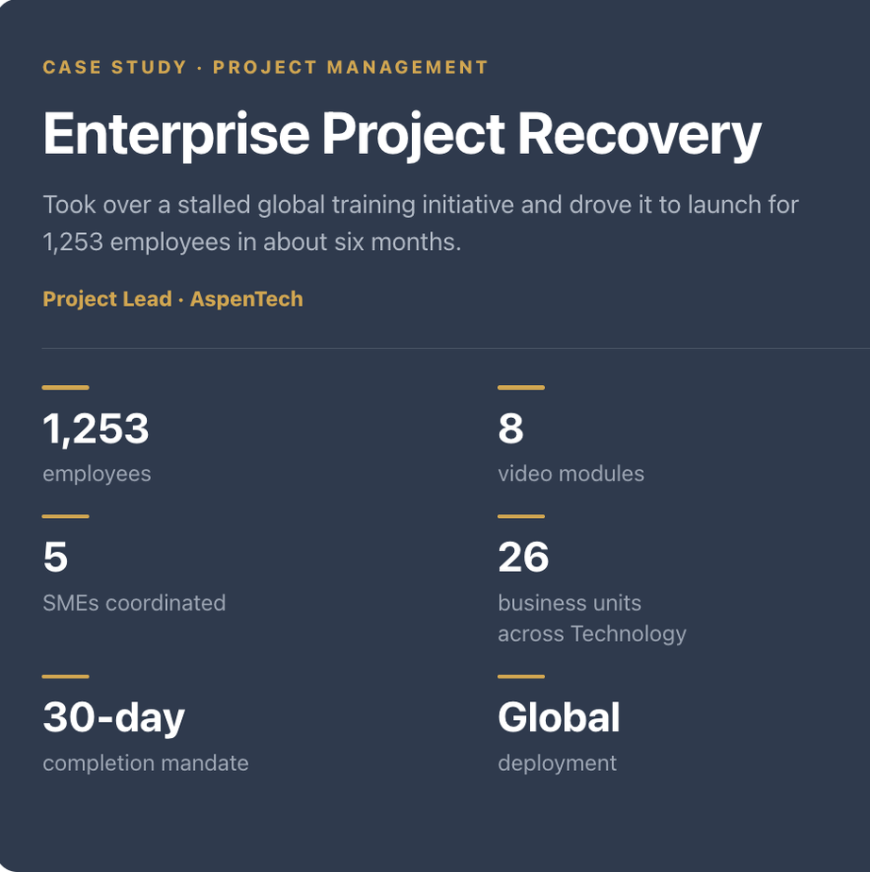
Taking over a stalled global training program and driving it to launch for 1,253 employees
—————————————————————————————————
Organization: AspenTech
My role: Project Lead
Scope: 1,253 global Technology employees across 3 reporting organizations and 26 business units
Platform: Workday LMS
Timeline: October 2025 to July 2026
Status: Complete. Launched June 19, 2026, 30-day completion window closed July 20.
—————————————————————————————————
Summary
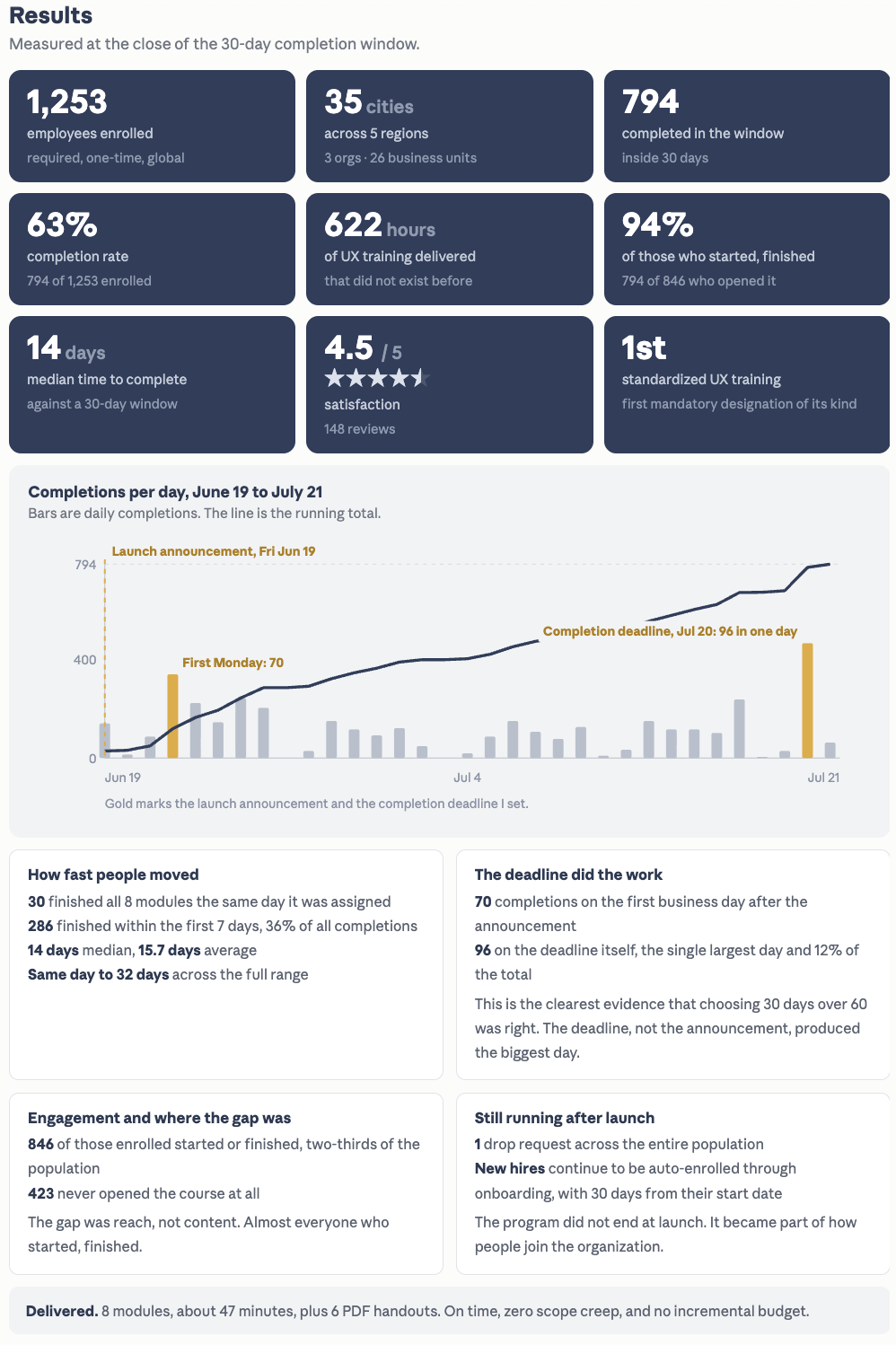
I inherited a stalled, mid-cycle training initiative after the project manager left, reset it, and delivered it as mandatory training to 1,253 employees across three reporting organizations globally. It launched in June 2026 and closed its 30-day completion window in July with a 63% completion rate and a 4.5 out of 5 satisfaction rating across 148 reviews.
I ran this alongside two product design tracks, SLM and the Compass field-operations app, and an enterprise accessibility program, without letting the training program pull my product delivery off schedule. The launch date itself moved more than once while I waited on an LMS resource to be hired and then trained. That dependency was outside my control, so I managed it rather than absorbed it, and kept everything downstream ready to go the moment it cleared.
—————————————————————————————————
The problem
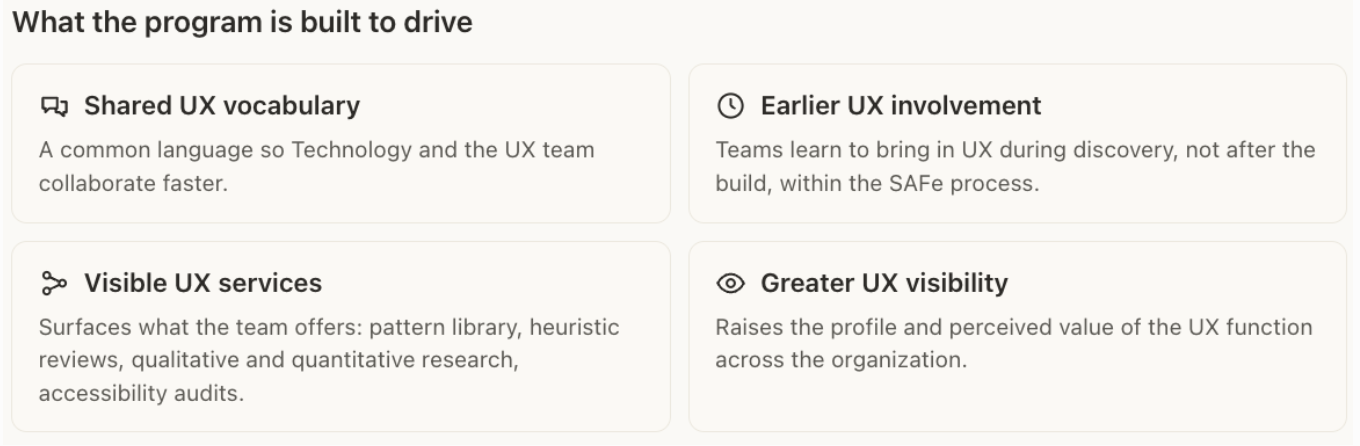
AspenTech's Technology organization had no shared understanding of UX. Product, engineering, and design were working from different assumptions, and the cost showed up two ways. Late-stage rework meant product revisions landing during delivery cycles, delaying launches and compressing market windows. Siloed execution meant product and engineering teams building features in isolation without early cross-functional alignment, which produced fragmented user workflows.
A training program had been started to address this, but when the project manager was terminated on December 2, 2025, the initiative stalled and was at real risk of being abandoned. What existed was three separate plans, one for current employees, one for new hires, and one for executives, all optional, all untracked, and largely built on external YouTube and Udemy videos that had nothing to do with how AspenTech actually works. I had sourced and distilled those videos myself that October in a supporting role, so I knew firsthand where the approach fell short.
—————————————————————————————————
What I did
Stabilized it first. The project manager left on December 2. I stepped in to hold the remaining team together and keep the work moving through the gap, then took full ownership on December 15.
Reset the plan. I audited the inherited work with the incoming VP of Product Design, retired all three legacy plans, and rebuilt the program around one goal: give non-designers the vocabulary and context to work with the UX team, rather than teach them design skills.
Benchmarked against a parallel initiative. A sister design team at Emerson was building its own UX training at the same time. On January 8 I received and reviewed their materials, and on February 24 I joined a working session with their team to decide whether to merge efforts or run separately. Two differences settled it. Their program ran on Udemy with optional, self-selected enrollment, while ours ran on Workday, which made a tracked, mandatory, org-wide rollout possible in a way their platform could not easily support. And theirs taught design skills, centered on heuristics for everyday development, while ours taught collaboration, teaching non-designers what UX is and how to work with the design team. Because the two served fundamentally different goals, I recommended running them independently rather than merging. That call let us commit fully to a mandatory, collaboration-focused, AspenTech-specific curriculum, which became the strategic foundation for everything that followed.
Scoped the audience. I narrowed a vague "everyone" to a defined group of 1,253 employees across three reporting organizations and 26 business units, spanning engineering, product management, QA, and DevOps. The definition was written by reporting line rather than by job title, everyone rolling up to three named executives, with one organization explicitly excluded, and global rather than US offices only. I put that specification in writing with HR and confirmed it back more than once, because the same definition had to drive two different systems: the distribution list for the announcement and the enrollment configuration in Workday. If those two had drifted apart, some people would have been told about a course they were never assigned, or assigned one they were never told about. Because bulk enrollment cannot be undone, getting this list right mattered more than getting it fast.
Built the curriculum. I directed five UX and design subject-matter experts plus leadership through a compressed eight-week production sprint covering eight modules, about 47 minutes total, plus six downloadable PDF handouts. Each SME owned a module in their core expertise area. The VP of Product Design recorded both the Welcome video, which established organizational priority, and the Accessibility module, drawing on his own expertise in that domain. I wrote, recorded, and edited my own module, and coordinated all scripts, slides, videos, and supporting documentation across the timeline.
Ran the program against a baseline. After the reset I set a milestone schedule and tracked against it rather than working to a vague launch window. Scripts locked January 23. Slide decks reviewed and approved January 30. All content locked February 27 after dry runs. Those dates were the checkpoints I managed the SMEs toward, and they are the reason the content was finished and waiting well before the delivery dependency cleared. I gave the sponsor a standing weekly update on status, risks, and what I needed from him, and set my top three priorities each Monday and reported against them, renegotiating openly when something had to move rather than quietly letting a date slip.
Protected the SMEs' bandwidth. Every contributor was balancing this against their primary product work. I set clear, non-negotiable milestone deadlines upfront, then deliberately cut meeting overhead and moved continuous feedback into asynchronous channels instead. I ran a shared group chat where the team tracked announcements and due dates, shared templates, asked questions, posted drafts, and gave each other quick feedback on final deliverables. I held targeted one-on-one troubleshooting sessions with each team member and with leadership, and took on some of the video editing myself for the busiest contributors. All eight modules were delivered on time and on quality, with zero scope creep.
Won an unprecedented mandate. Making the course required meant clearing a four-tier HR approval chain: HR Strategic Planner, HR Culture Director, HR Director, and Senior Manager, HR Americas. Early guidance from the HR Culture Director was that mandatory status for a tech-org initiative was highly unlikely. I pitched the scope, the business value, and the time commitment to the HR Director and the Senior Manager, HR Americas, drawing on my Emerson benchmarking to make the case that an optional model would depend on self-selection, while a mandatory, Workday-based model would guarantee the org-wide shared vocabulary needed to head off late-stage engineering rework. They set a condition: my VP would need to present to the org leaders and win their buy-in on their teams spending the time. I prepared and briefed him, he pitched the leaders and got their go-ahead, and I took that back to close the approval. It became the first mandatory training designation of its kind in the organization, carrying a completion mandate for existing staff and permanent integration into new-hire onboarding. The sponsor left the length of the completion window to me, anywhere from 30 to 60 days depending on what was typical. I set it at 30. A longer window does not produce more completions, it produces more forgetting, and the deadline is what actually drives people to finish.
Cleared the critical path. There was no LMS resource available to configure and load the course. The single corporate Workday administrator was fully backlogged with company-wide open enrollment and performance reviews, and the dependency sat directly on the critical path to launch. I offered to upskill in the Workday backend and run the uploads myself to speed it up. That was declined, and I was told to wait for a resource to be hired, which took about two months. Over that stretch I followed up with HR in writing every two to four weeks, each time asking a specific question rather than a general status check: what is the training timeline, what do you need from me, who owns the next step. That kept the dependency visible and on the record so it could not slip silently. I used the wait to finish everything downstream that did not depend on it: launch communications, module QA, the enrollment list, and the rollout sequence.
When an administrator was finally hired, she was new to the role and did not yet know how to do the work the launch required, which pushed the date again more than once. I drove her ramp-up rather than waiting on it. I set up recurring sessions with her and her trainer to lock down a support timeframe and clear her open questions, and coached her one-on-one through the setup. Two problems in particular needed solving. The enrollment could not be loaded from a spreadsheet the way we had assumed and had to be built by supervisor groups directly in Workday. And the out-of-scope customer support and training group had to be excluded from the assignment, which nobody on the LMS side knew how to do. When her trainer went out of office at the point we needed answers, I asked who else could help, learned a contractor knew the system, and set up a working session with the three of us to find a workable approach. We solved both problems in that session and got the course ready to launch.
Wrote the build specification and tested against it. Rather than hand over a folder of files and hope, I wrote a full specification for how the course should be assembled: title, course description, side panel metadata including runtime, skill level, lesson count and delivery mode, search tags so people could actually find it, the cover image, and all eight lesson titles with their descriptions and runtimes. I got the sponsor's approval on that spec before it went into the system, so there was one agreed definition of done.
Then I checked the build against it, and the first version was wrong. The PDF handouts had been loaded as standalone lessons, so the course displayed fourteen lessons instead of eight, which would have made a 47-minute course look twice as long to a mandatory audience. I wrote back with the structure explained plainly, then listed every lesson with its exact title, description and setup notes, marking clearly which lines were instructions for her and which were text to enter, since she was new to the tool and working in her second language. I also flagged the missing runtime in the side panel. When she came back that the platform could not attach a PDF inside a video lesson at all and offered three alternatives, I chose the one that preserved the eight-lesson structure and added a requirement to it, that each affected lesson description point learners to the resources section so the handouts would not go unnoticed. I also had the sponsor review the built course in Workday before we scheduled anything.
Verified the launch assumptions before committing to a date. Our whole communication plan rested on one belief: that the system would automatically notify people when the course was assigned. Before I let anyone commit to a date, I asked the administrator directly whether that email would actually go out and what it would say. It turned out the automatic notice was minimal and context-free, which is what drove the decision to pair enrollment with our own announcement. In the same message I asked four other operational questions: who would perform the assignment, what turnaround she needed once I gave the go-ahead, whether she needed anything further from me, and whether she could set the completion window and the mandatory flag. Her answer to the turnaround question mattered more than I expected. She needed one to two working days, not minutes, which changed how the launch had to be sequenced.
Coordinated the launch communications. The announcement was its own workstream, not an afterthought. I drafted the launch email copy and put it through HR review well before anyone touched design. That took a few rounds. HR came back asking me to replace a promotional section with an introduction that explained why the training had been identified as important for Technology in the first place, and to spell out the targeted audience in the email itself. Both were right, and I revised accordingly and got the sponsor's approval on the updated text. I did not have a contact in Internal Communications, so I asked the HR partners I was already working with who owned that, and they pointed me to the Senior Manager of Employment Brand and Communications. I approached her with a clear ask and an explicit scope boundary, that we wanted the email branded and polished but that the sponsor wanted it launched quickly, so whatever she could reasonably do was welcome, and I asked her up front how much time it would take on her end rather than assuming her availability. She surfaced a gap I had missed, that the email needed a named contact for questions about both access and content. I took that back to the sponsor, who decided he wanted every question routed to himself rather than split with the LMS administrator, and I relayed that decision and confirmed his exact name and title for the copy. I also recognized where the message needed to come from the sponsor rather than from me, and looped him in to lead the communication to the wider HR group directly. We locked the final version well ahead of launch day.
Controlled the launch. Bulk enrollment cannot be undone, and the announcement email would state a launch date, which meant that once it went out we were committed. So I set an explicit rule with the administrator: build the course out completely, test it, and stop with the enroll click as the only remaining step, then tell me before clicking anything. The sequence was hers to finish, mine to trigger, and the email would not go out until the course was genuinely ready. On launch day I ran a supervised working session with the administrator and the communications lead. The administrator submitted the assignment, we confirmed together that enrollment completed and the course was working in Workday, and only then did I give communications the go-ahead to send. The email explained what the course was, the 30-day completion deadline, and a single point of contact for questions, to supplement the generic Workday notice that otherwise tells employees only that a course has been assigned, with a link and no context.
Drove completion, not just enrollment. A mandatory designation enrolls people. It does not get 1,253 people across a dozen time zones to finish a course inside thirty days. I planned communications around two moments, the launch push and a reminder as the window closed, and both are visible in the completion data.
Followed through after launch. Shortly after go-live, feedback surfaced that the six PDF handouts were not appearing where learners expected them in the course layout. I chased it down with the administrator and got the placement addressed rather than treating launch as the finish line. I also handled a stakeholder objection from a product team whose work had been used as a design-improvement example without advance notice, which is covered in detail below.
—————————————————————————————————
What I would measure next
Reach, completion, and satisfaction are the outcomes available inside a thirty-day window. The problem the program was built to solve, late-stage rework and siloed execution, moves on a much slower clock, and honestly, the cost of that problem was visible to everyone but was never formally quantified before this project started. If I owned the next phase, these are the leading indicators I would track:
UX pulled in earlier in the SAFe cycle. The target is UX engaged a full sprint ahead of the development team rather than after the build.
More cross-functional projects that include UX. Fewer products shipping with only developers and product managers involved, and more teams asking us in, which improves more of the user experience rather than a slice of it.
Accessibility demand rising. More teams requesting accessibility audits, and more attention to whether their code and their design choices are accessible in the first place.
Design system adoption over custom code. Teams reaching for the design system instead of building custom components, which is where most of our accessibility problems originate.
Each of those is observable within a quarter or two and traces back to the shared vocabulary the course was built to create.
—————————————————————————————————
Core project management competencies demonstrated
Project recovery. Stabilized and reset a stalled initiative during a sudden leadership vacancy.
Upward leadership. Built the business case, then equipped my sponsor to win the buy-in that unlocked approval.
Stakeholder navigation. Cleared a four-tier HR approval for a mandatory designation with no precedent.
Scope and risk management. Absorbed a change from three optional briefings to one global mandatory program.
Dependency management. Kept a critical-path bottleneck visible and drove the new resource's ramp-up.
Quality management. Wrote the build spec, tested against it, and caught a structural defect before launch.
Execution under constraint. Delivered while concurrently owning two product tracks and an accessibility program.
Strategic judgment. Benchmarked a parallel initiative and chose to differentiate rather than merge.
Conflict management. Absorbed a public objection without escalating, and treated the criticism as a roadmap.
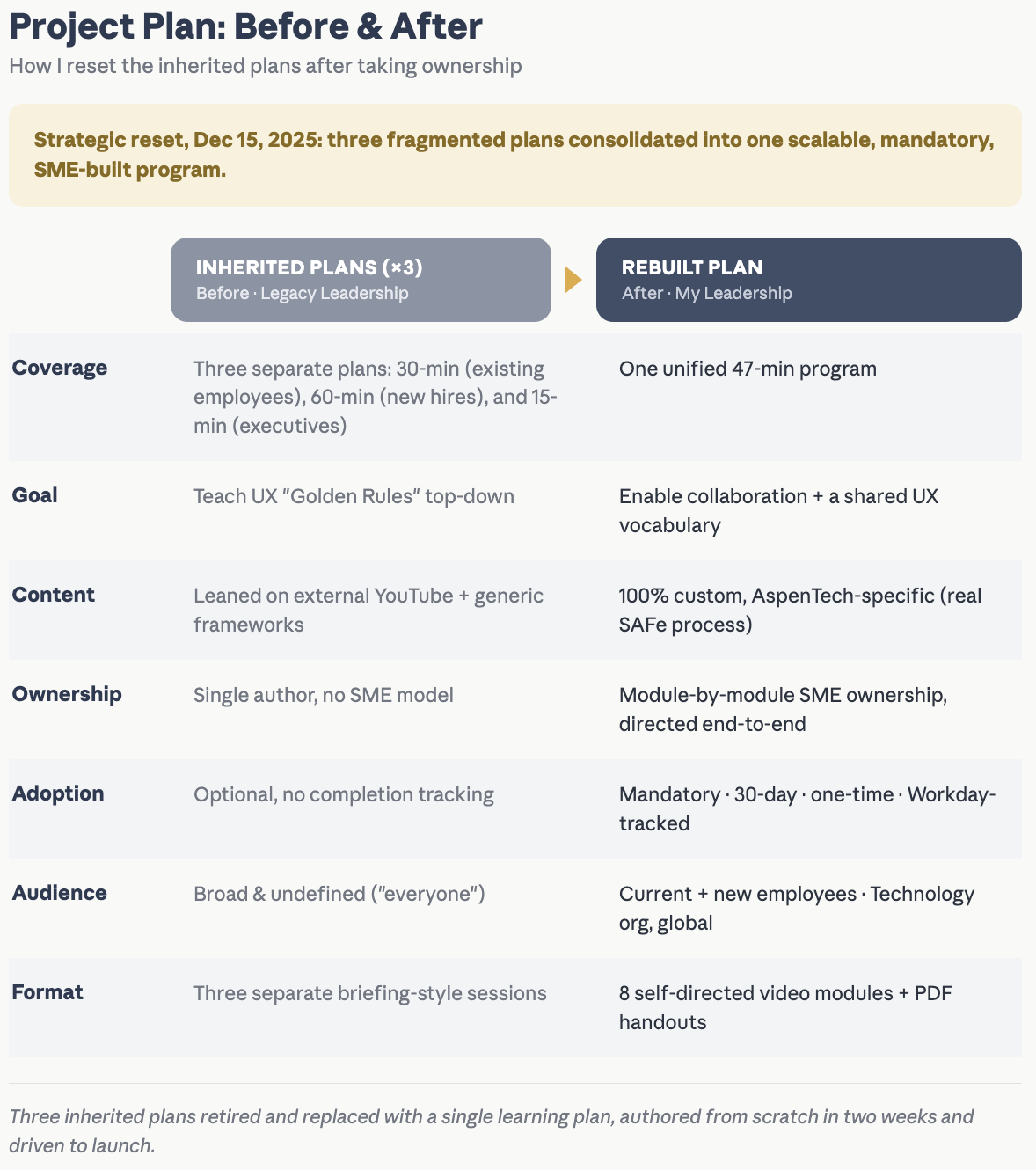
Strategic assessment and before-and-after operational comparison, detailing the consolidation of fragmented legacy briefings into a unified, 45-minute, SME-built corporate training infrastructure.
Download Legacy Project Plan 1 - (New Hires onboarding)
Download: Legacy Project Plan 2 - (Existing Employees)
Download: Legacy Project Plan 3 - (Executives)
Download Rebuilt (New) Project Plan ( New Hires, Existing Employees & Executives )
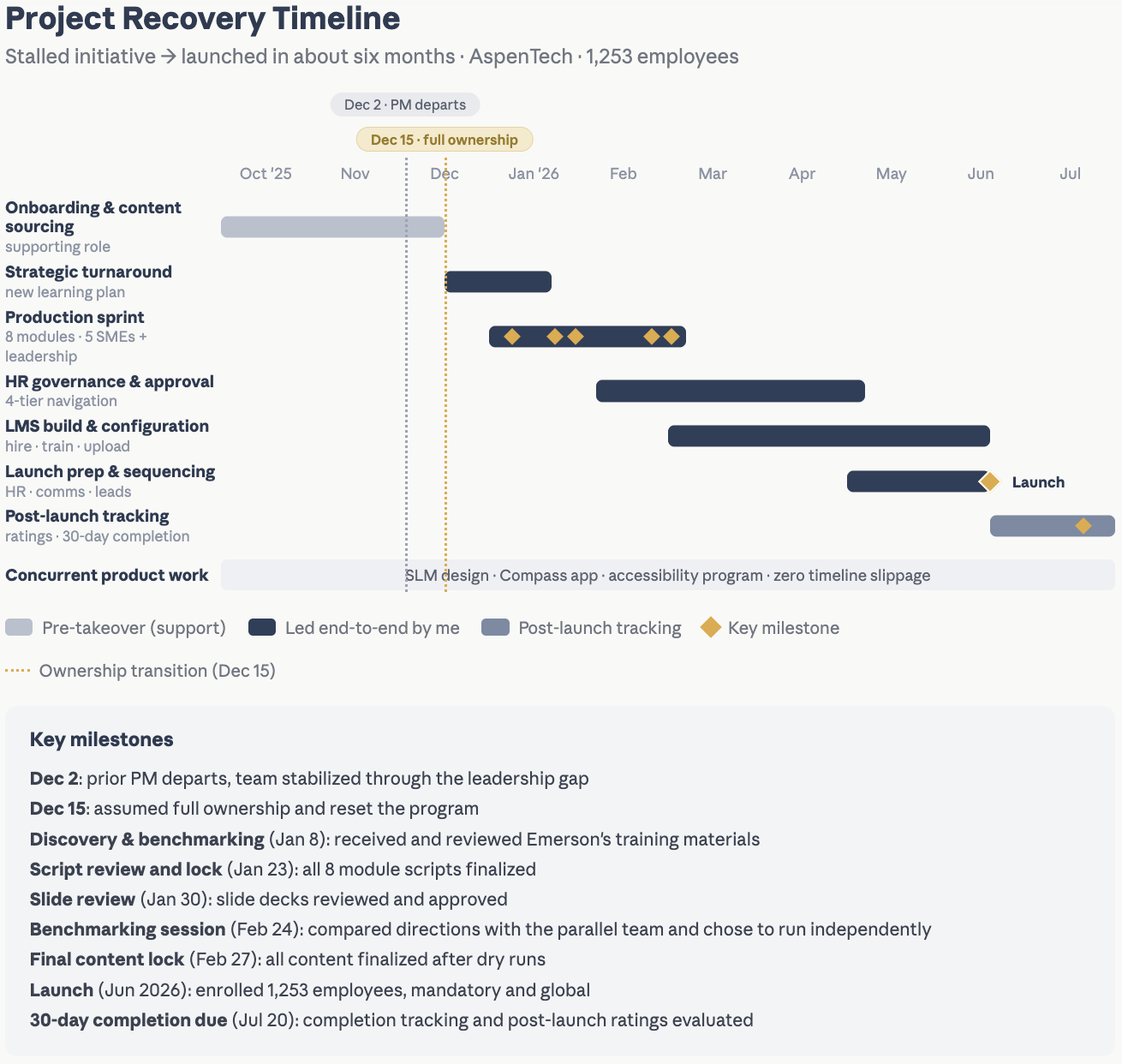
I took ownership mid-stream after the prior PM left, reset the plan, and drove it to a mandatory launch for 1,253 employees from December to June, while running my product and accessibility work in parallel. Each phase is tracked against its dependencies, including the LMS resourcing bottleneck that sat on the critical path, with milestones dated from takeover through the 30-day completion window.
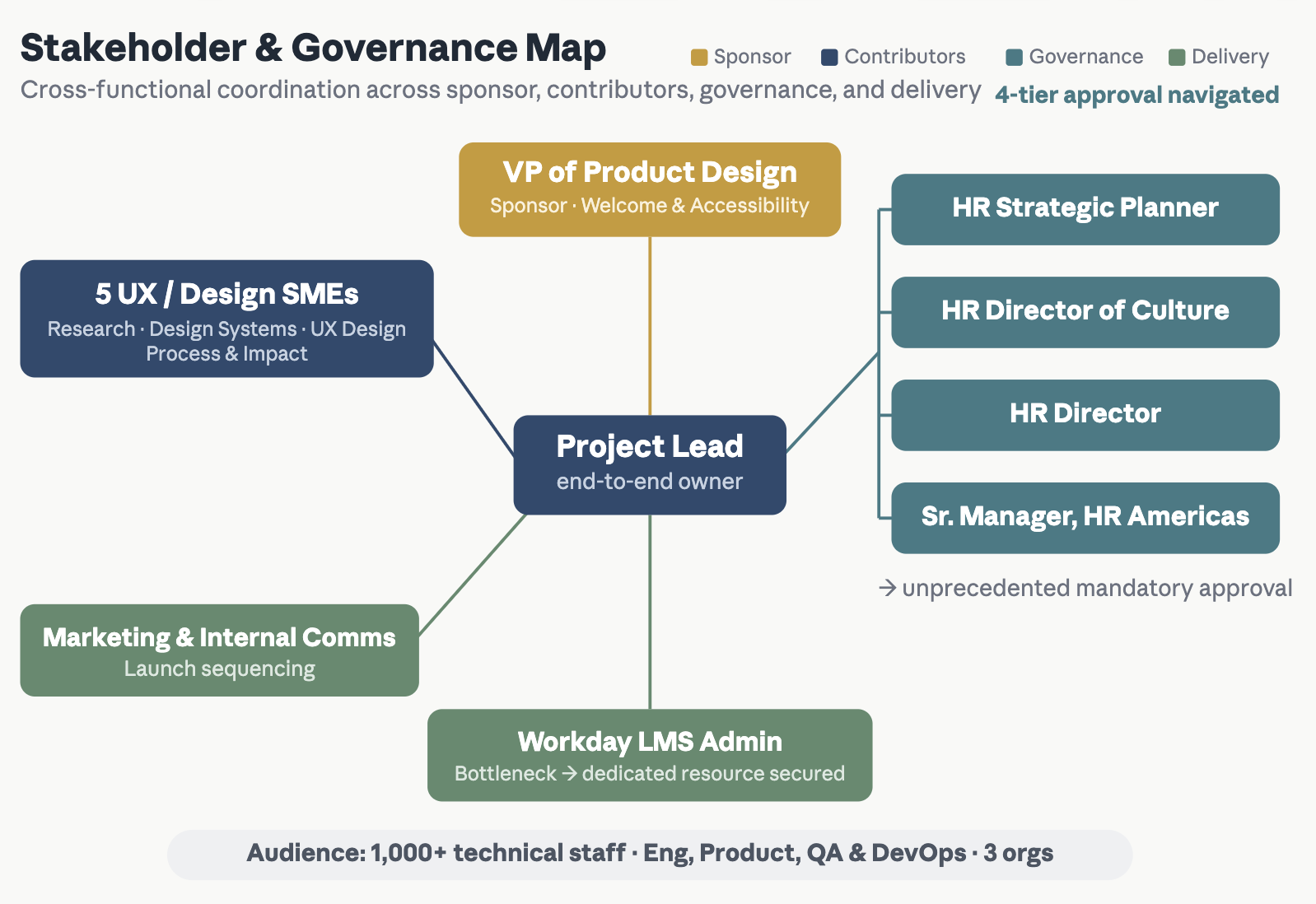
Global deployment audience map and operational governance matrix, established to navigate the 4-tier HR compliance framework, secure dedicated LMS administration resources, and define mandatory assignment criteria across all core technology disciplines.
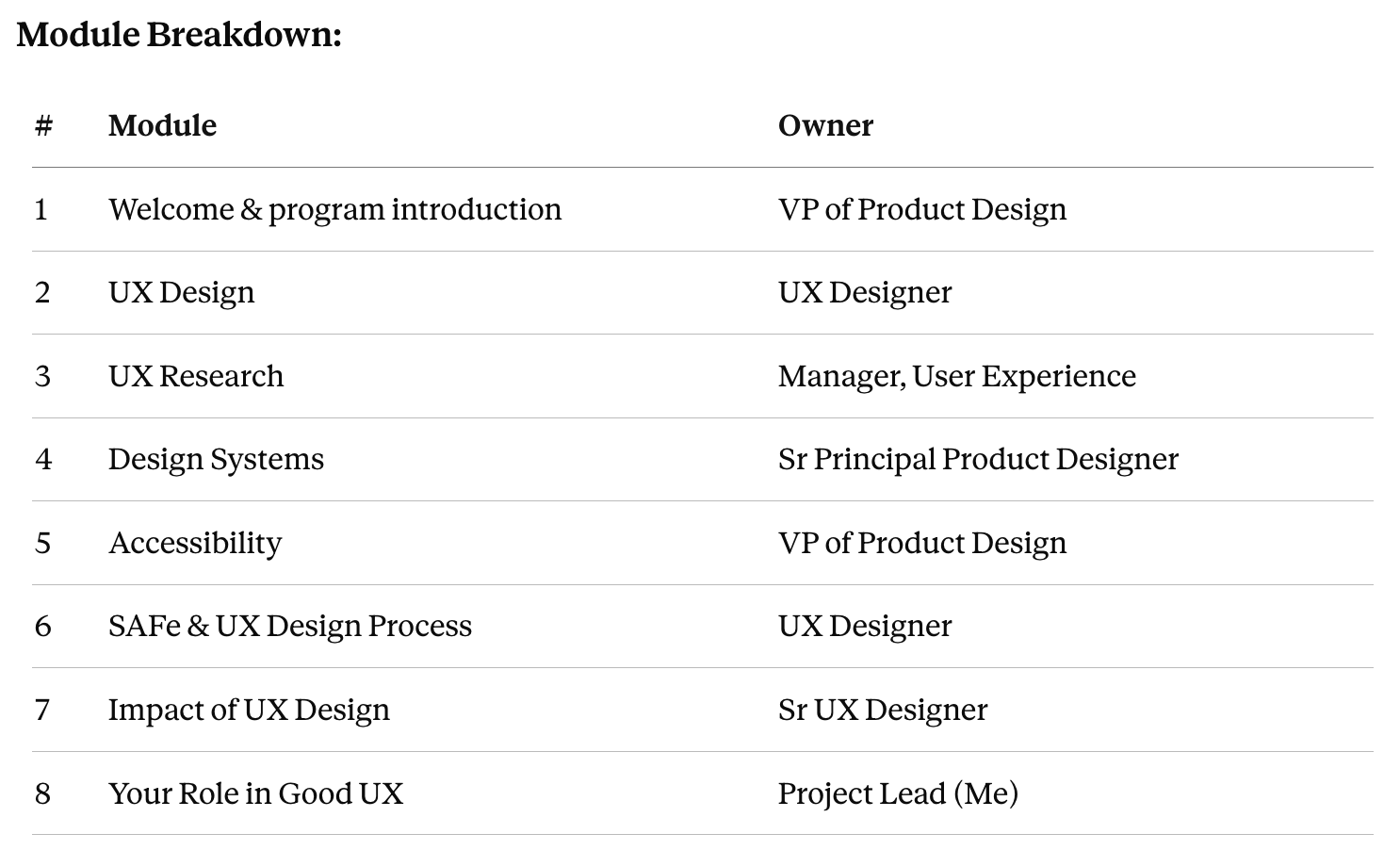
As Project Lead, I split the eight-module curriculum across five SMEs and leadership and directed it end to end. Each owner drove their module's script, slides, and video on a shared eight-week production schedule.
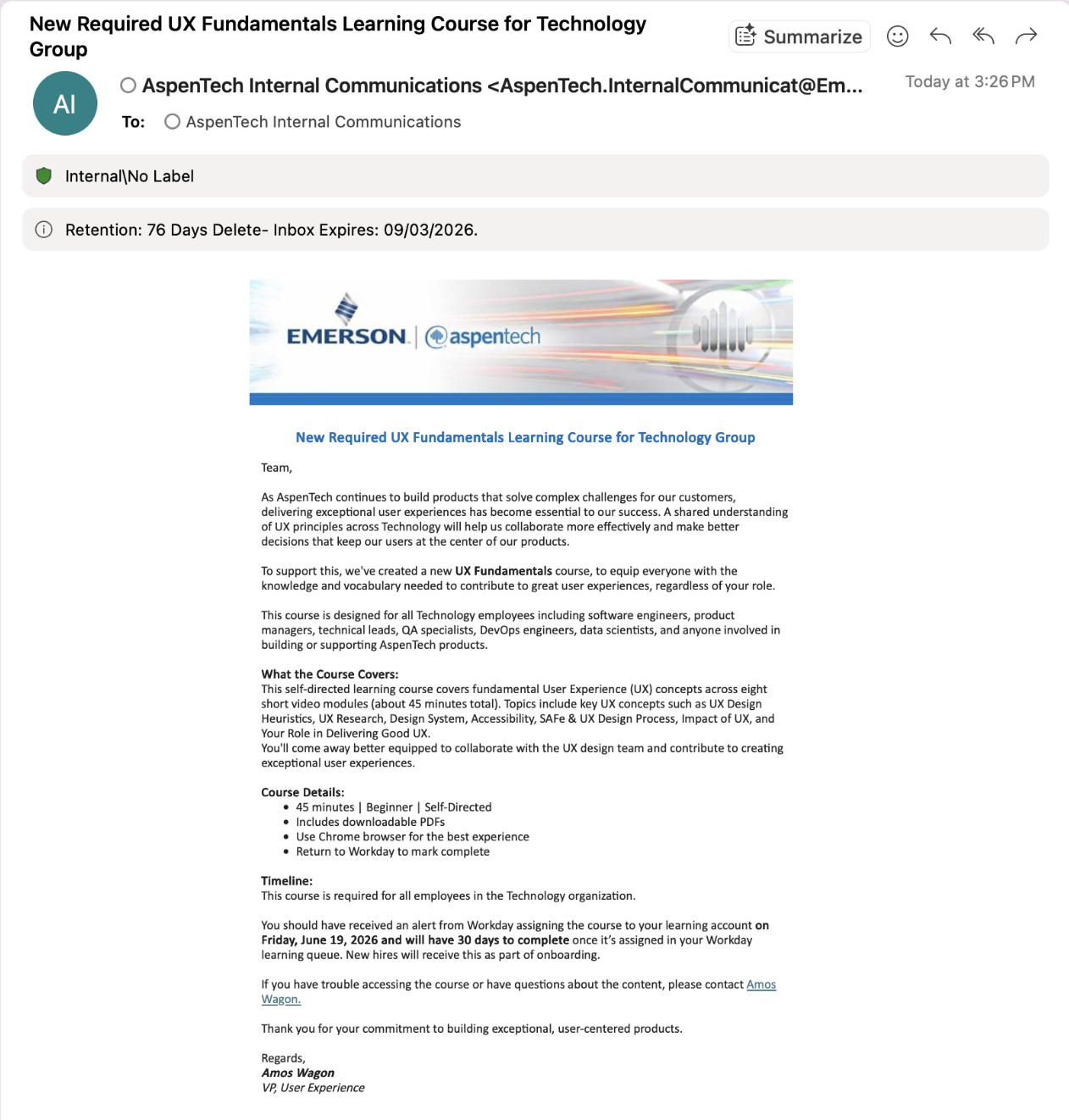
To make sure the course landed well with our software engineers, product managers, QA specialists, and data scientists, I ran a company-wide rollout campaign. We sent out a clear announcement (shown in Screenshot ) to set expectations, share clear timelines, and get everyone on the same page.
Here is how we set up the launch for success:
Broad Impact: We made the training a requirement for all current technology employees and built it directly into the onboarding process for new hires.
Clear Timelines: We set a firm 30-day completion deadline in Workday to keep the momentum going after launch.
Proactive Support: We included basic technical troubleshooting tips and a direct contact line for questions upfront to keep help desk tickets low and prevent user frustration.
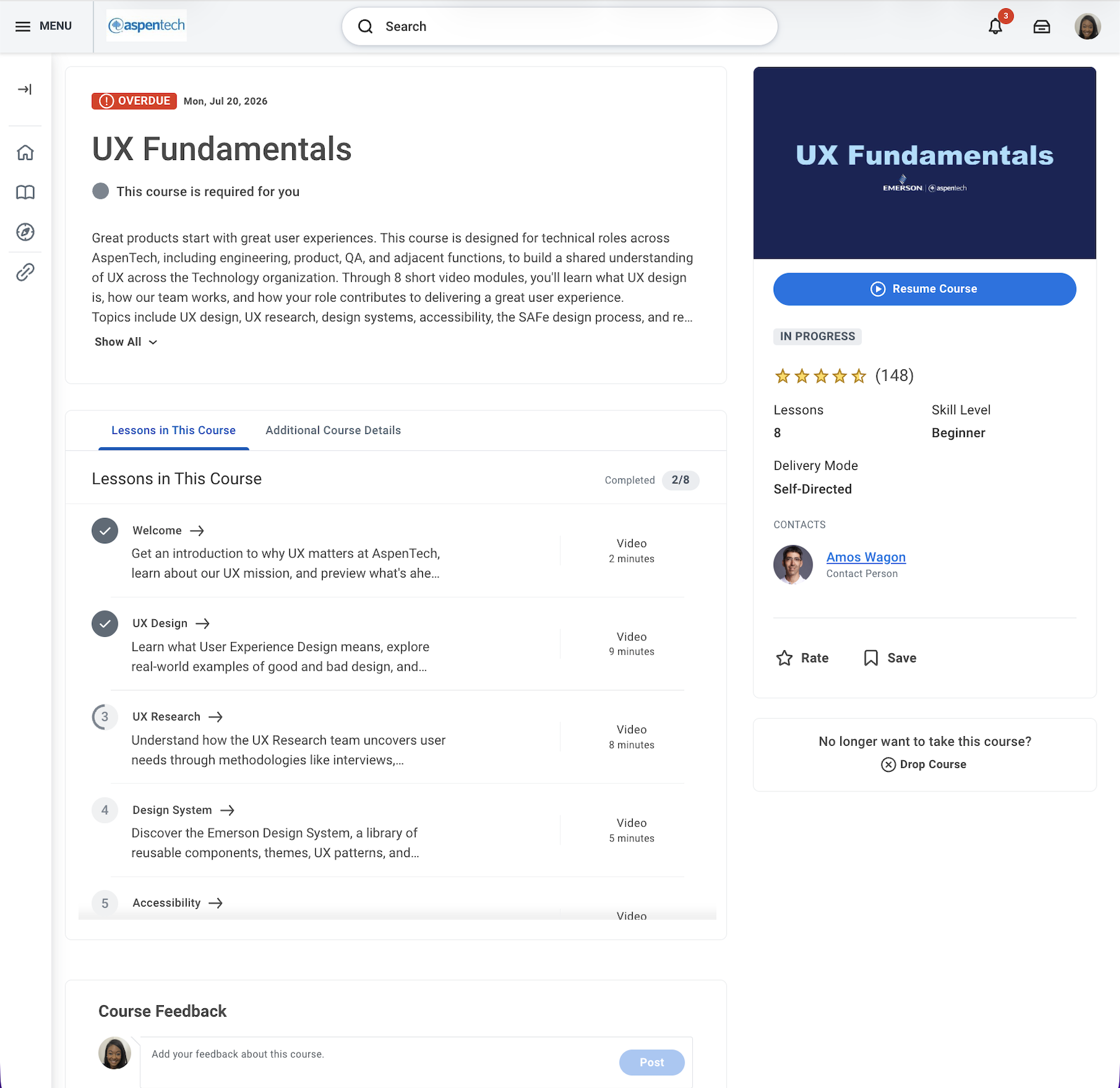
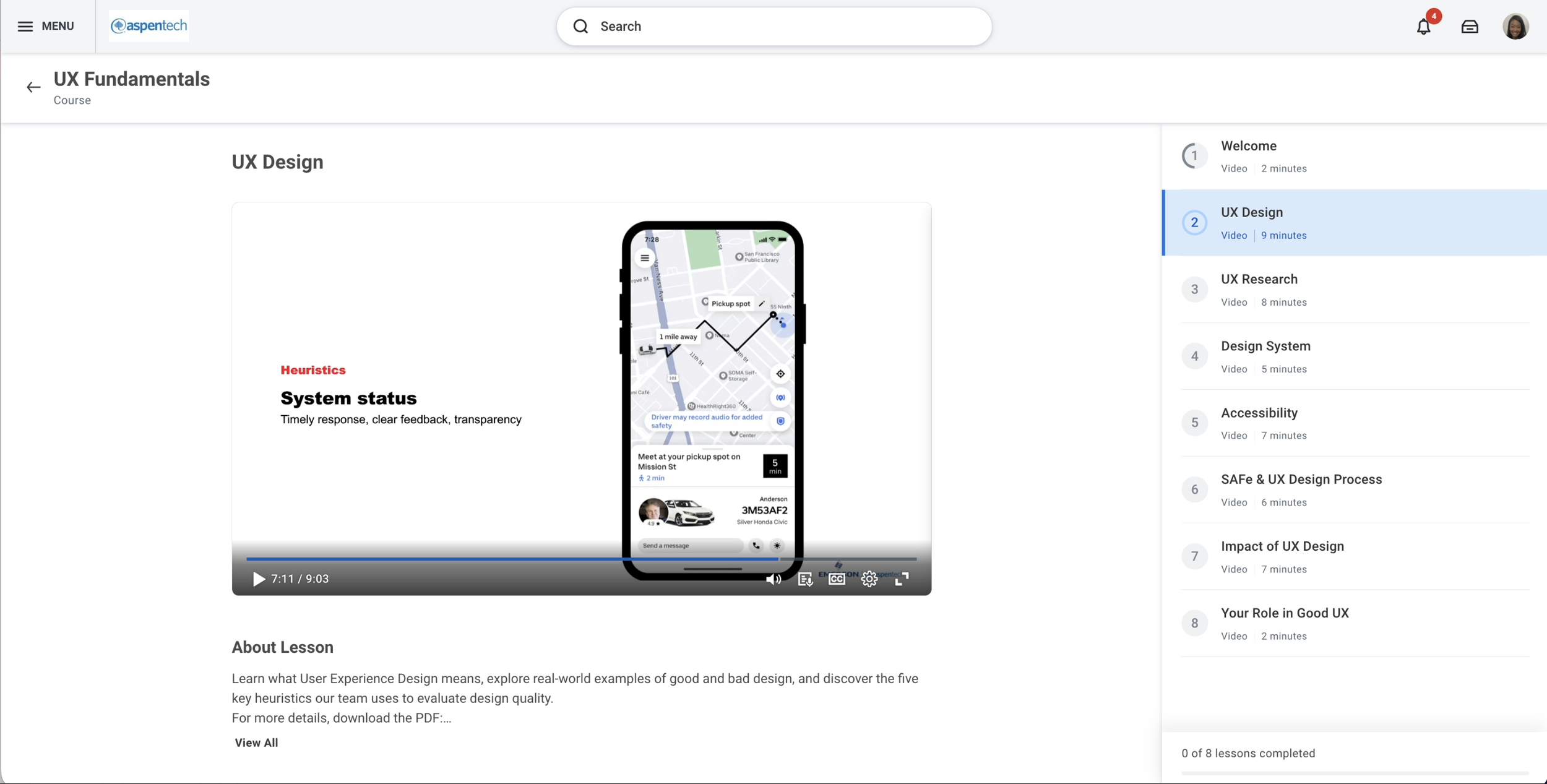
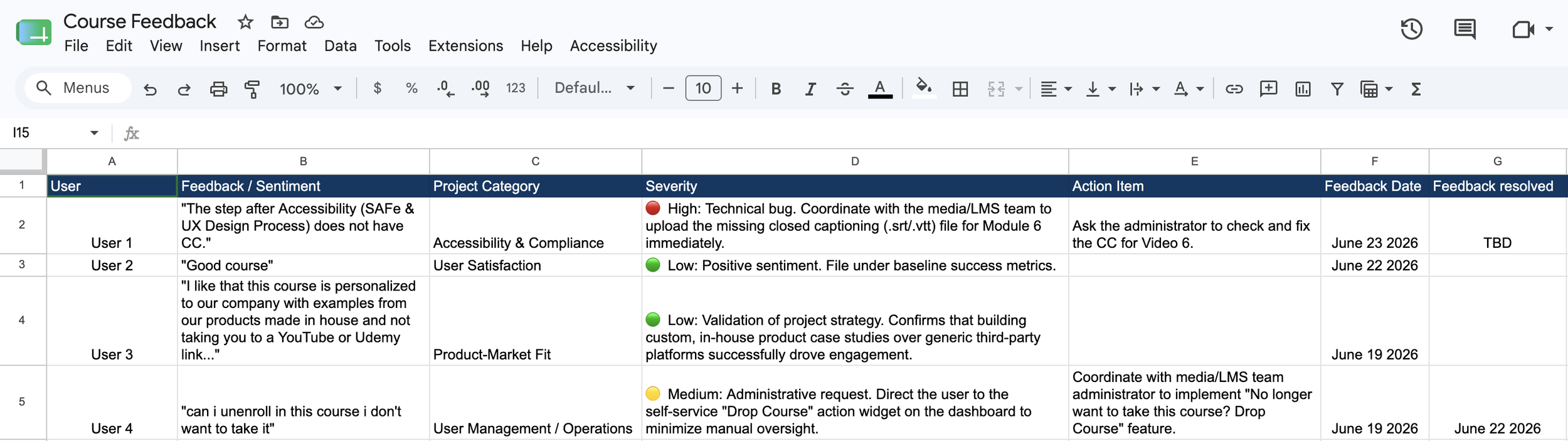
To handle user feedback efficiently during the launch window, I built a structured tracking framework to categorize, prioritize, and action user inputs in real time:
Continuous Feedback Loops: Established automated data collection to catch technical bugs, operational friction, and user sentiment immediately following deployment.
Severity Matrix: Developed a color-coded triage system (High/Medium/Low) to distinguish critical accessibility blockages from minor administrative requests.
Operational Agility: Translated user feedback directly into clear, cross-functional action items to ensure quick system updates and continuous program optimization.
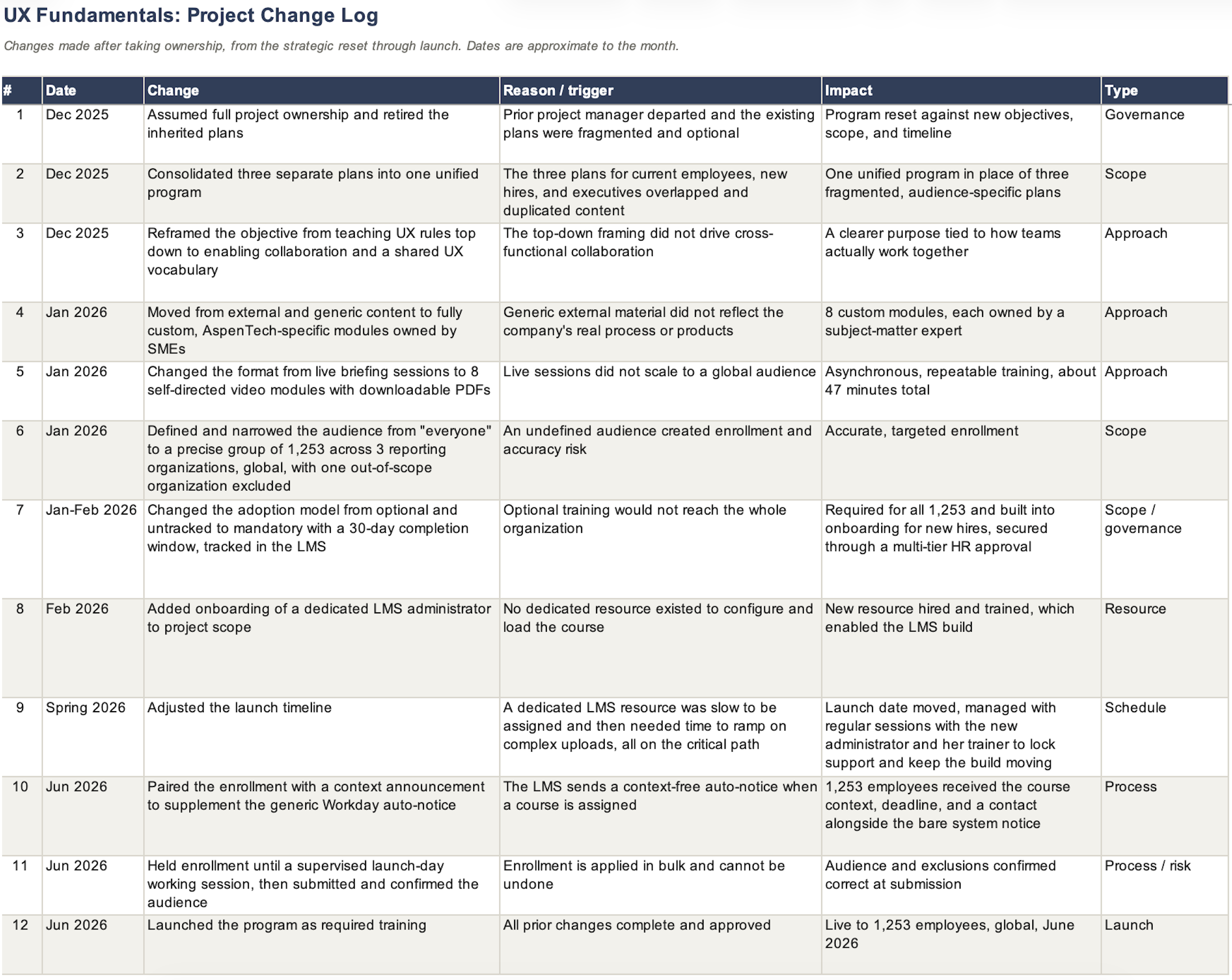
Each change after taking ownership, logged with its trigger and its impact on the program, not just the action taken.
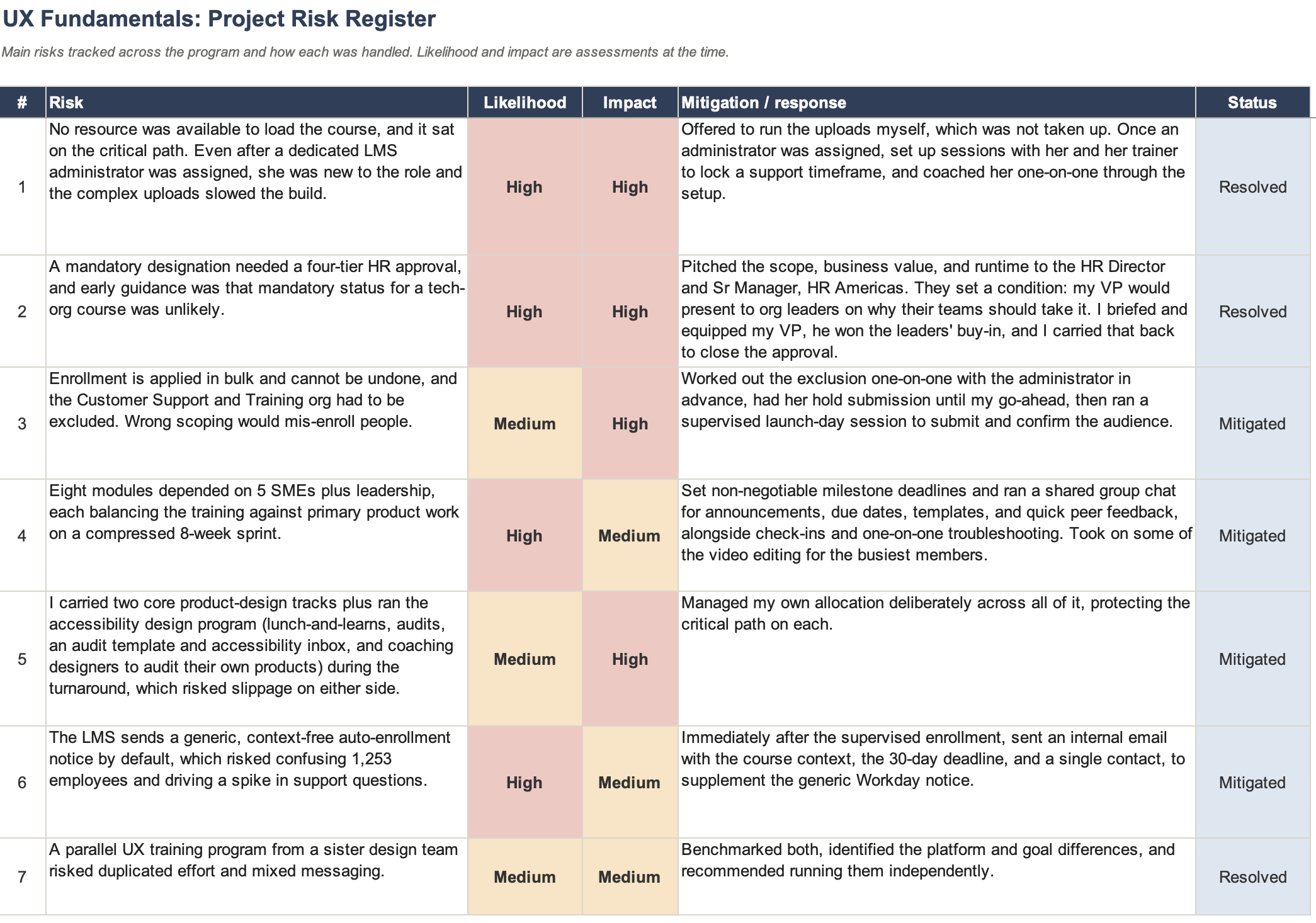
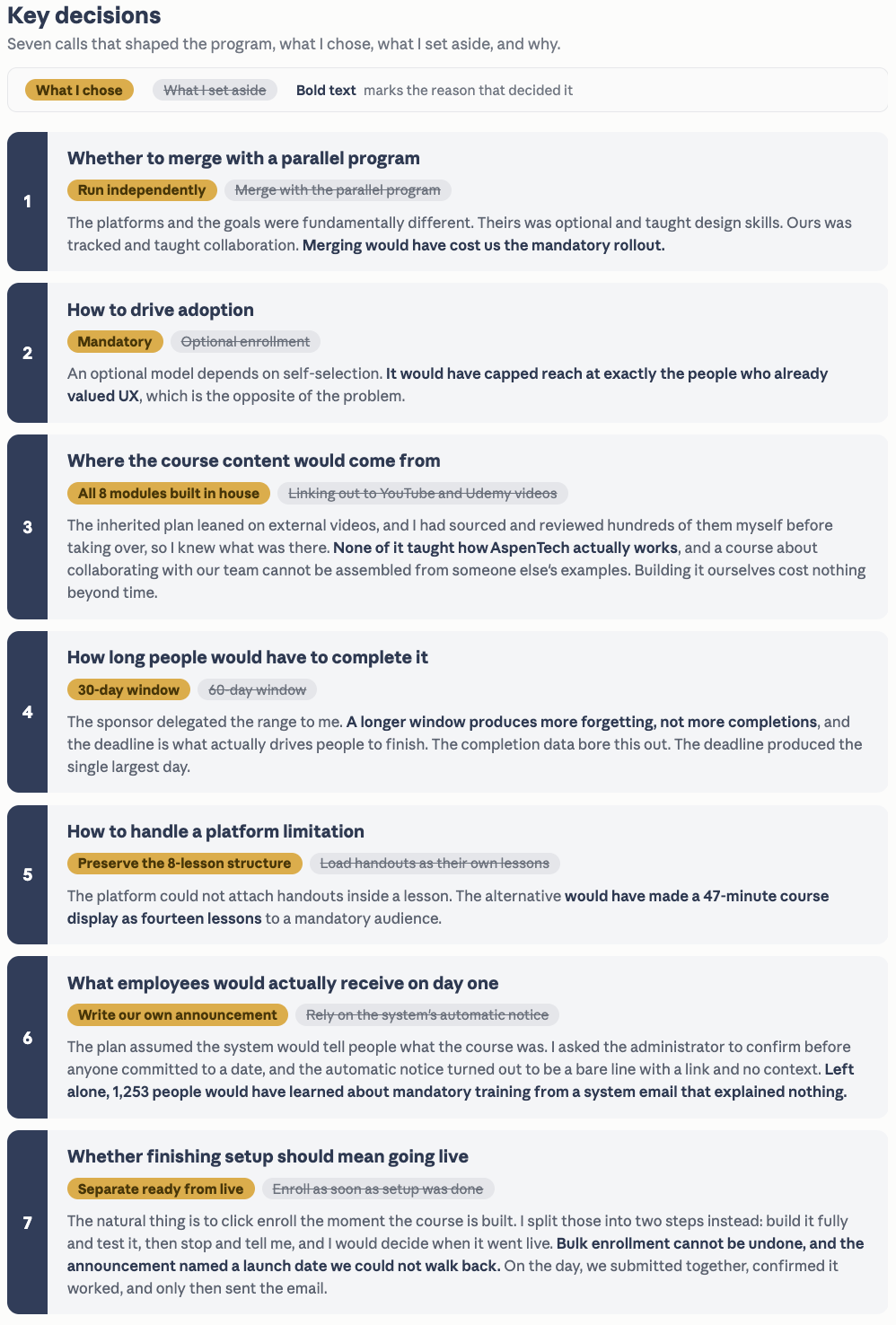
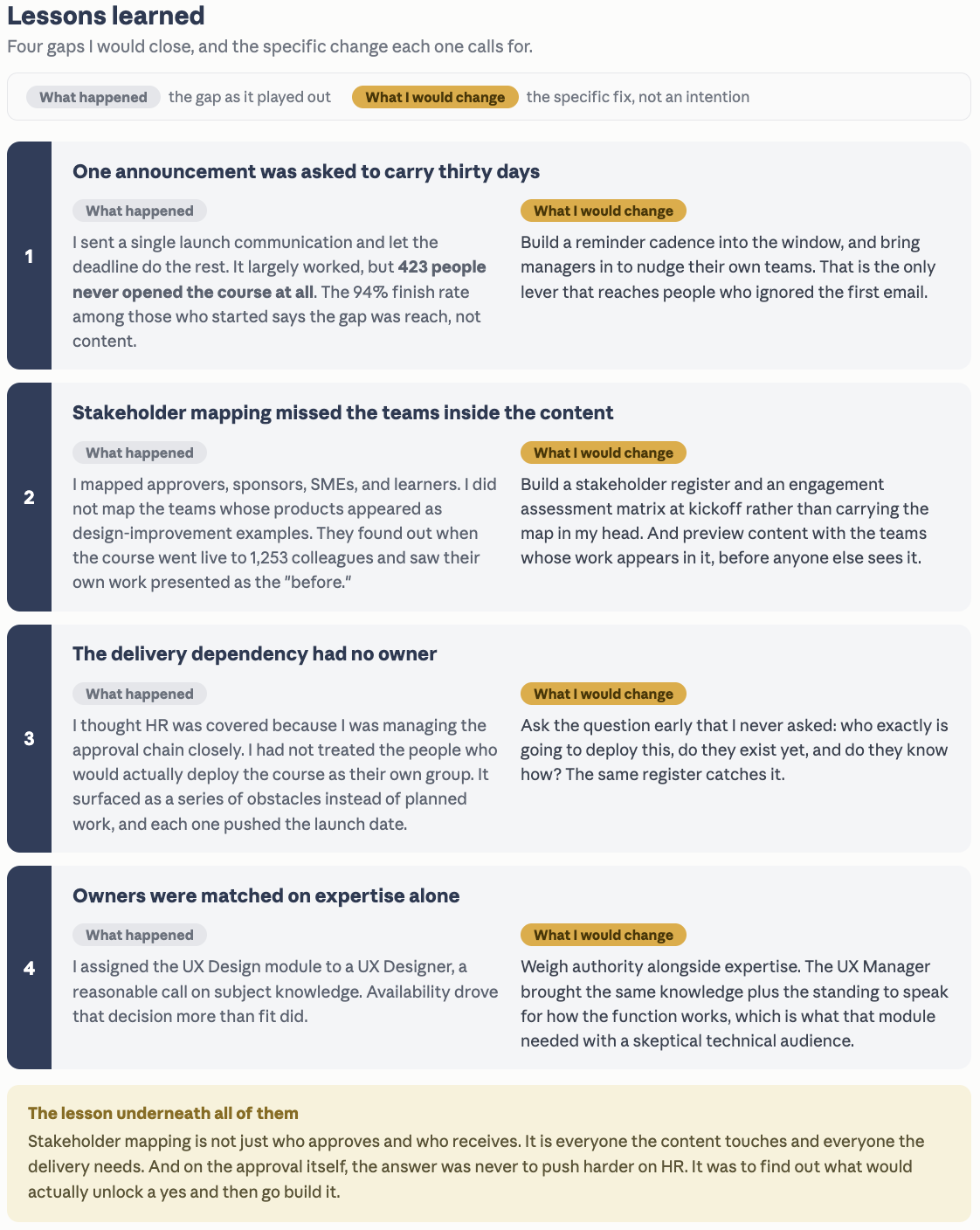
Driving Accessibility Across Product Teams
Building the product-design accessibility program within AspenTech's company-wide initiative
Product-design accessibility lead · AspenTech (an Emerson company) · Dec 2025 – present
WCAG 2.1 AA · Section 508 · VPAT/ACR · SAFe
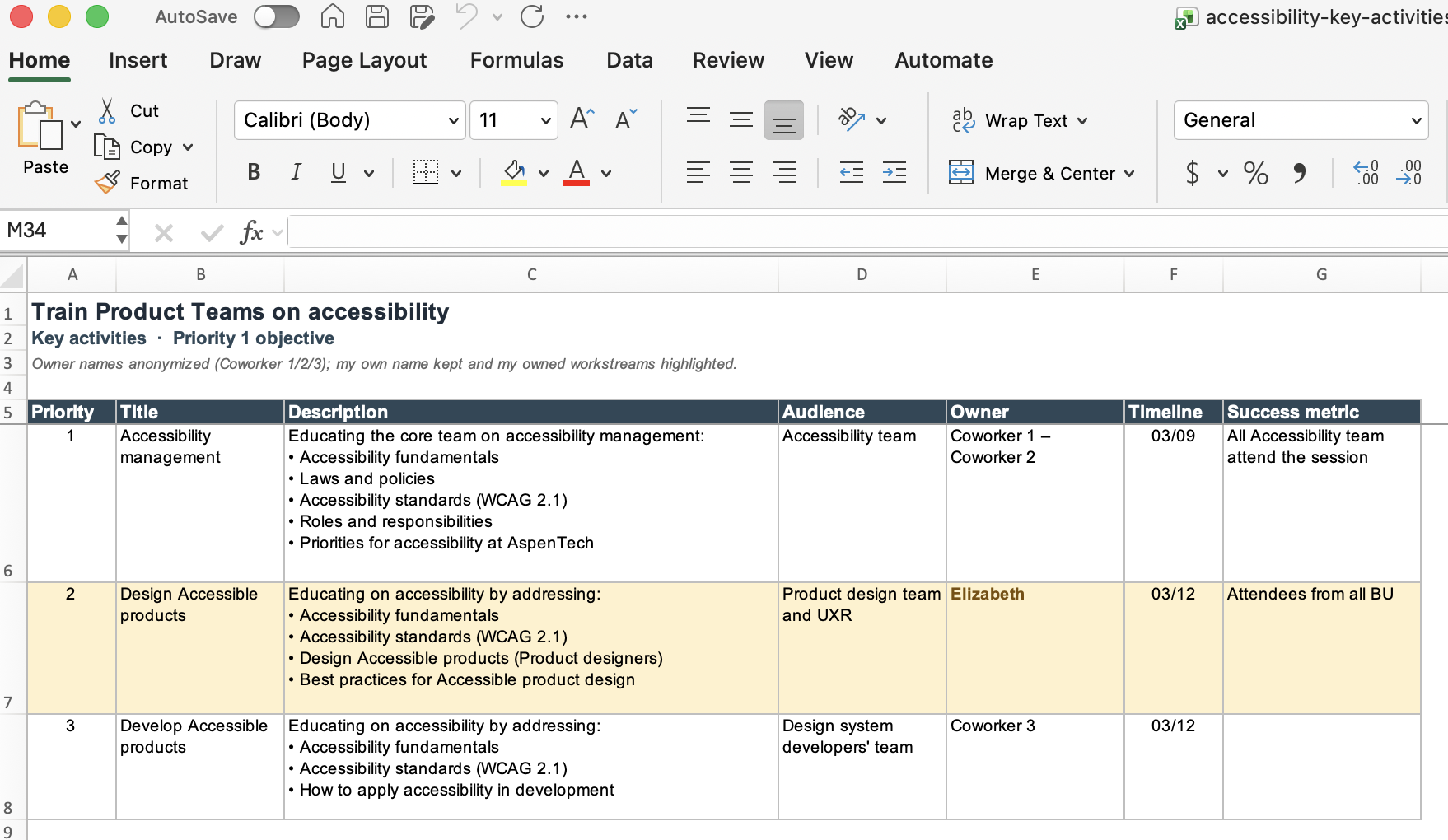
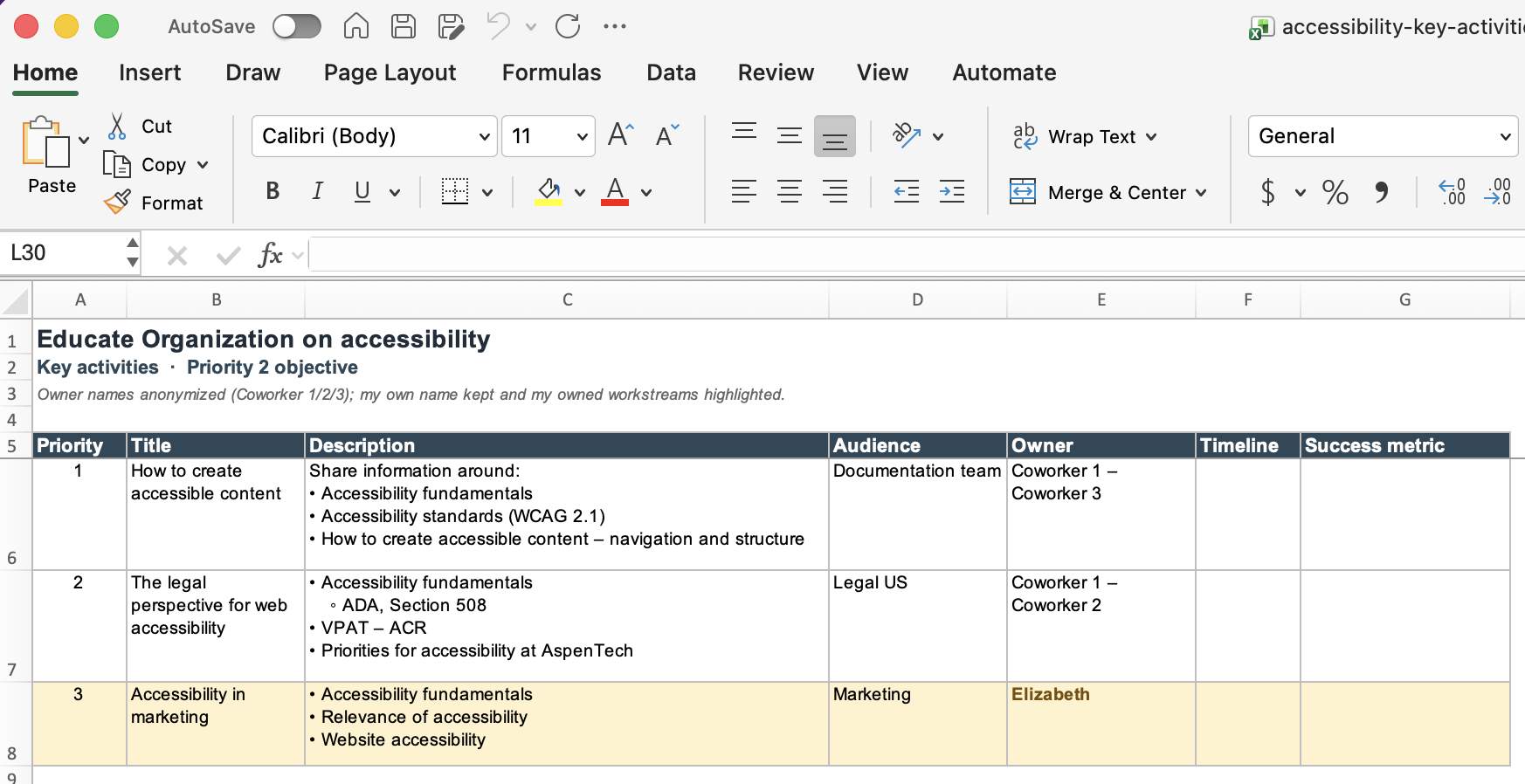
Everything below ran off a structured accessibility enablement plan I helped build — three prioritized goals with owners, timelines, and success metrics — which is what makes this one coordinated program rather than a set of one-off projects.
Strategy & structure
The accessibility enablement plan — the prioritized roadmap (3 goals, objectives, owners, timelines, success metrics) that tied the workstream together; I built the product-design portions
Audits & conformance
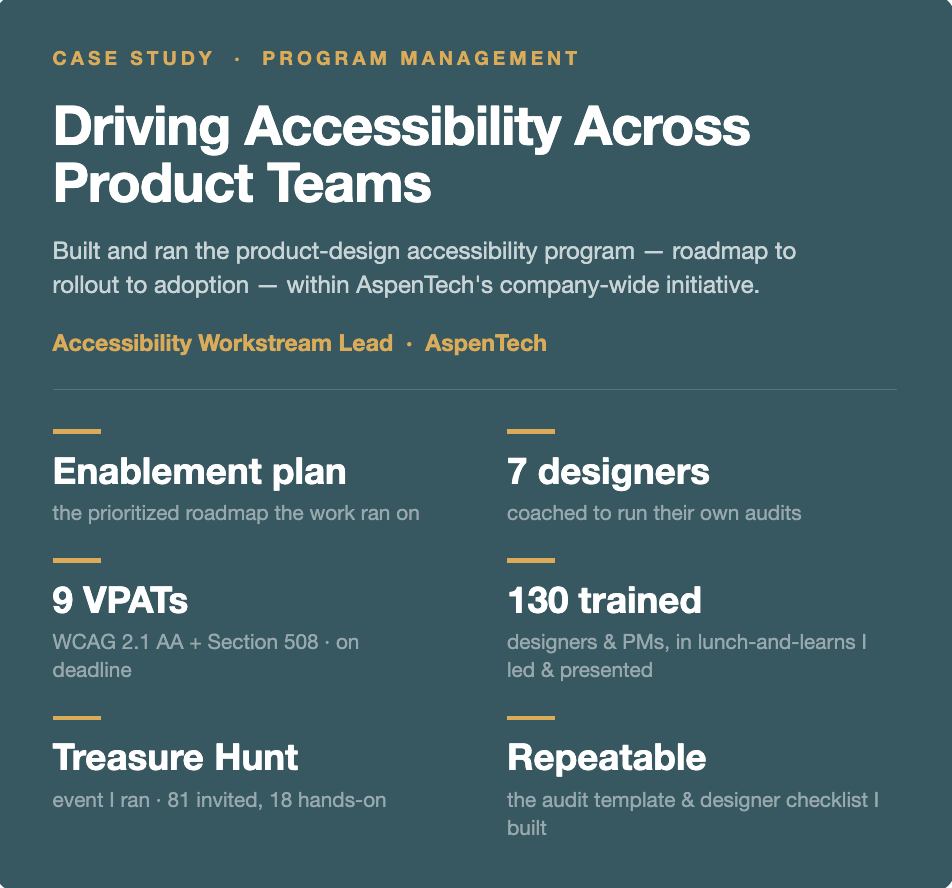
9 VPAT/ACR conformance assessments completed
7 designers coached through the audit cadence
4 product audits completed (3 designer-led)
Audit process + WCAG 2.1 template — built from scratch
Training & enablement (sessions I led / presented)
Designer lunch-and-learn — ~12 attended (the full design team)
PM lunch-and-learn — 118 attended across 2 sessions
Marketing/web enablement — delivered
Self-serve channels — intake email, UX newsletter, monthly office hours
Awareness event I ran
Treasure Hunt — 81 invited · 18 attended · 3 hands-on tasks · prizes for all
Program-wide context (the broader initiative)
9 enablement webinars · 400+ employees reached in live attendance
~1,150 staff in program scope across 6 roles
———————————————————————————————
Overview
AspenTech launched a company-wide program to build accessibility into how its teams design, develop, and test software, run day to day by a three-person accessibility team. I led the product-design workstream within it. Starting in December 2025 — when I was first asked to learn how to run an accessibility audit — I built the design org's accessibility practice end to end: the audit process and template, a coaching cadence that scaled auditing across the design team, the customer-facing conformance assessments clients request, and the training, channels, and events that drove adoption.
Why this matters
Accessibility has moved from a best-practice nice-to-have to a revenue-protecting requirement. Under the DOJ's ADA Title II rule, public entities' web and mobile content must meet WCAG 2.1 Level AA, with compliance deadlines extended to April 2027 for larger entities and April 2028 for smaller ones. Those obligations flow down to vendors, and AspenTech's client base shows why: public and government-funded universities fall under Title II and have to confirm that the software they procure is accessible, while private oil, gas, and utility clients carry VPAT requirements through their own procurement and contracts. Different buyers, different drivers — same deliverable. Each one needs a VPAT, the formal conformance report a client uses to evaluate a product before it buys or renews, which ties accessibility directly to revenue: if a product can't demonstrate conformance, affected clients can't renew. Getting products audited, documented, and remediated ahead of those deadlines is what keeps contracts renewable.
The challenge
Many AspenTech products were originally built without accessibility input, creating compliance gaps and a poorer experience for users with disabilities. There was no shared standard across teams, no accessibility built into how the org designed, developed, and tested software, and no repeatable way to respond to the VPAT requests already coming in. The company-wide program set out to change that across design, development, and QA. My mandate within it: stand up a repeatable accessibility practice in the product-design org, drive its adoption, and keep visibility on progress.
My role
I led the product-design accessibility workstream within the three-person accessibility team. I built the audit process the design org uses, drove its adoption through a structured coaching cadence, completed the VPAT/ACR assessments clients request, and ran the design-side training and awareness. This was a multi-team program — I didn't run the whole initiative — but the product-design practice was mine to build.
How I structured it
The program ran on a written accessibility enablement plan — a prioritized roadmap of goals, objectives, owners, timelines, and success metrics — that I helped build and contributed the product-design portions to. It was organized around three sequenced goals: transform the org to an accessible mindset (train product teams, educate the org); make all new work accessible (an accessible-by-default design system, accessibility embedded into the design and development process); and bring existing products up to standard (audit on demand, prioritized by usage). Each activity carried an explicit priority, so the team always knew what came first and why. Training came first — you can't fix what people don't know how to build. Legacy-product audits were handled on demand, focused on the high-usage applications and core workflows where customer and compliance risk was greatest. And design-system developers were trained ahead of everyone else, since the foundation others build on had to be in place first.
[image: program scope slide] [image: prioritized key-activities plan]
What I built
I built the product-design accessibility practice across four areas.
Planning & structure. I helped build the accessibility enablement plan and owned the product-design portions — the prioritized roadmap the design workstream ran on.
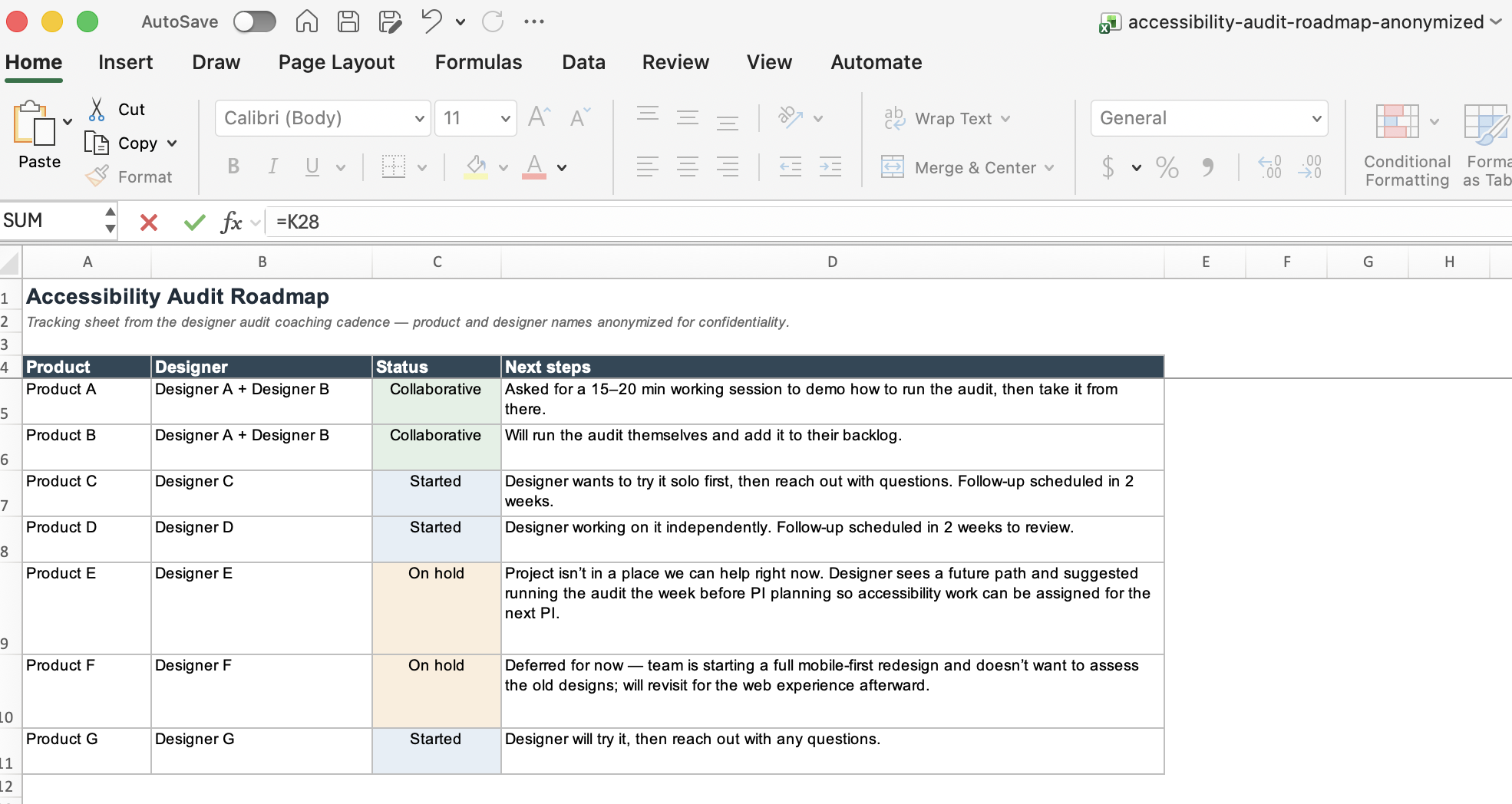
Process & audits. I created the WCAG 2.1 audit template the design team standardized on, translating the standard's A and AA criteria into practical, repeatable checks designers could apply themselves. Around it I built a two-round coaching cadence: a kickoff 1-on-1 where each designer committed to auditing a product during the PI sprint, then a follow-up session to review their findings and refine the work — with the template improving each cycle from their feedback. I scoped the hands-on audits to the 7 designers who actually own products, and the cadence has produced 4 completed audits so far, 3 run by the designers I coached and 1 by me — proof the process scaled beyond my own hands. Separately, I completed 9 VPAT/ACR product assessments — the customer-facing conformance reports clients request to evaluate how accessible a product is before they buy or renew.
[image: coaching cadence diagram] [image: audit template] [image: audit roadmap tracker]
Training & enablement. I ran the introductory lunch-and-learn for all 10 product designers and presented at the PM lunch-and-learn. For the designer session I designed and delivered the design-specific content — how to design accessible products, the audit walkthrough, and a live audit demo — alongside a colleague who covered the shared fundamentals. I also ran the marketing/web enablement, and built self-serve channels to scale the program beyond myself: a dedicated accessibility intake email and a UX newsletter article.
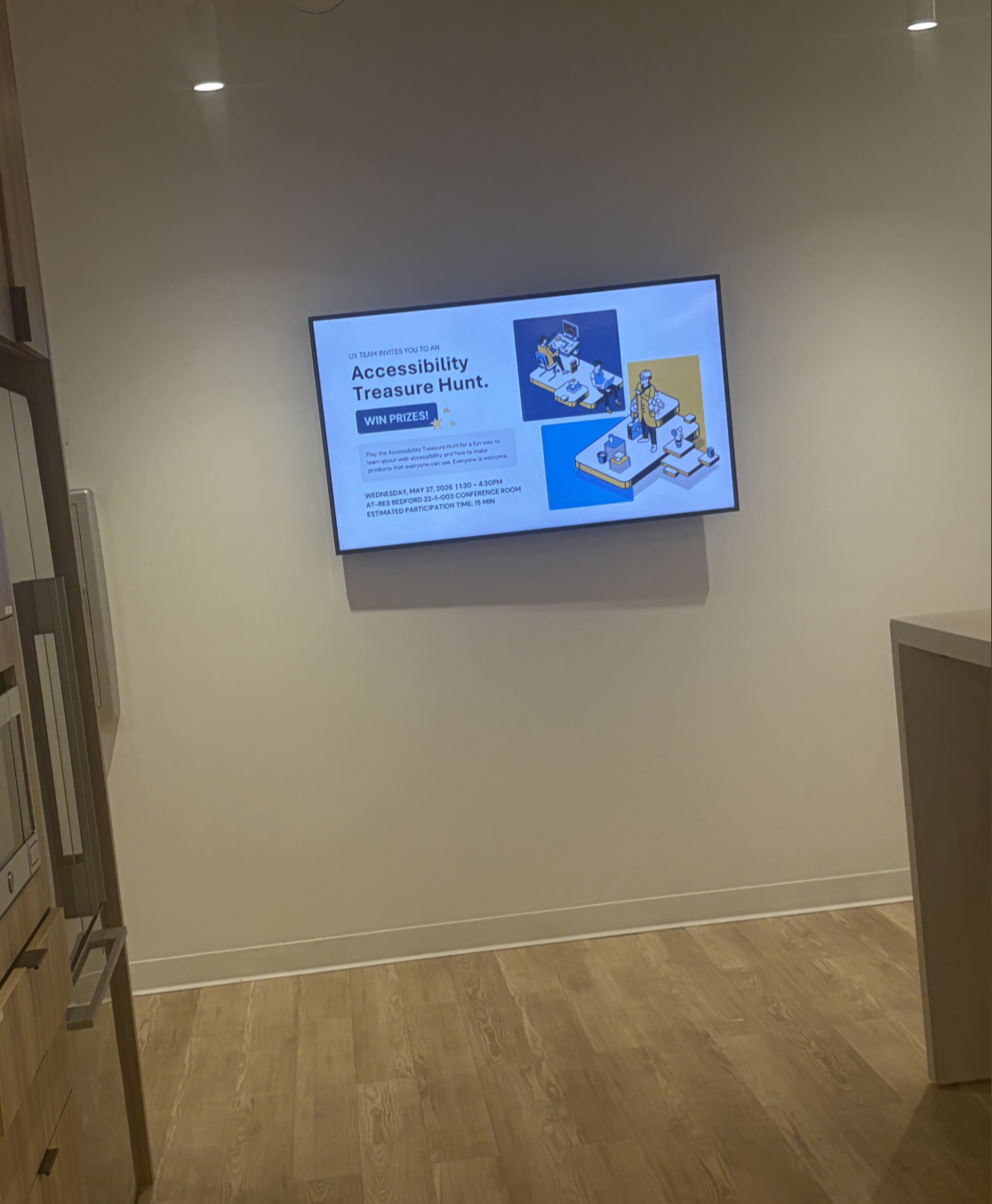
Awareness. I organized and facilitated an in-person accessibility awareness event, the Treasure Hunt. I invited 81 people across design, PM, and engineering via Outlook and Teams, built the challenge content by auditing our products for the issues attendees would hunt for, and coordinated with marketing to promote it across the office screens. The 18 attendees each completed three tasks to spot real issues — missing alt text, low contrast, keyboard traps — and earned a prize. When several systems went down at the last minute, I pivoted the activity to a live website on the spot, keeping the session running.
[image: Treasure Hunt promotion on the office screen]
Making it stick
The hardest part of any enablement program is making the change outlast the kickoff. Rather than treat training as a one-off, I worked to embed accessibility into the existing SAFe delivery process: accessibility acceptance criteria added to the Definition of Done (with accessibility defects treated at the same priority as functional ones), non-functional requirements defined at the Initiative and Epic levels, and accessibility surfaced in PI planning and system demos so it stayed visible every increment. I also helped launch monthly accessibility office hours to give teams standing access to the team.
Rollout
I sequenced delivery to respect real dependencies and a global org. Design-system developers were trained first. Sessions ran across March 2026, with separate Americas and Europe/Asia sittings to cover time zones, and recordings shared for anyone who couldn't attend live — alongside a standing resource library of cheat sheets, policy, and references to support onboarding.
Outcomes & impact
At the program level, the accessibility team delivered 9 enablement webinars across the org — 1 for designers, 2 for PMs, 6 for developers — reaching 400+ employees in live attendance across design, PM, and engineering, and launched a central resource hub and monthly office hours. My direct contribution: 9 VPAT/ACR assessments completed; the audit cadence built and run across 7 designers, producing 4 completed audits (mostly designer-led); the WCAG 2.1 audit template the team standardized on; the designer and PM lunch-and-learns and marketing enablement; the self-serve intake email and newsletter; and the Treasure Hunt event.
What this demonstrates
Program execution — built a repeatable process from scratch and drove its adoption. Commercial awareness — tied the work to contract renewals and revenue, not just compliance. Coordination and follow-through — ran a structured two-round cadence with 7 designers, turning an optional practice into tracked commitments. Delivery management — worked a growing queue of VPAT requests against client deadlines. Stakeholder enablement — trained designers and PMs and built self-serve channels to scale the program. Communication — translated technical standards into practical guidance and promoted the work org-wide.
Reflection
When I started in December, I'd never run an accessibility audit. What the next few months taught me is that moving a whole organization toward accessibility isn't about auditing every product yourself — it's about building a process simple enough that other people will actually use it, then getting them to own it. The clearest proof was watching designers run their own audits and flag fixes to developers before release, without me in the room. If I did it again, I'd push the Definition-of-Done and non-functional-requirement changes even earlier, because embedding accessibility into how teams already work is what makes it outlast the training.
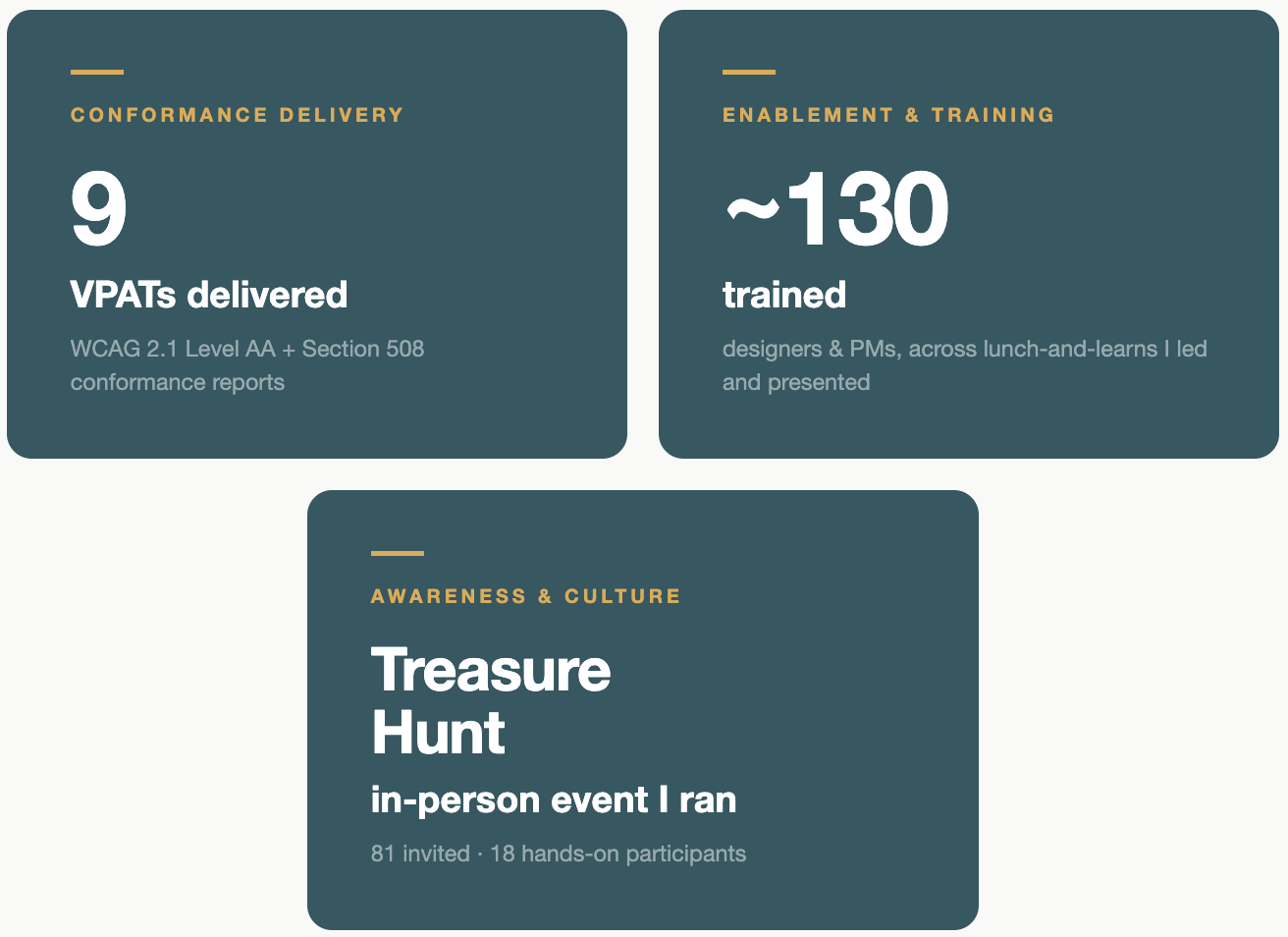
These VPATs aren't a compliance checkbox — they're a contract enabler. The client base splits two ways: public and government-funded universities, which fall under the ADA Title II web accessibility rule (WCAG 2.1 Level AA, April 2027 deadline) and have to confirm that any software they procure is accessible; and private oil, gas, and utility companies, where a VPAT is a standing procurement and contract requirement. Different buyers, different drivers, one deliverable — a documented conformance report that keeps the deal moving. I've delivered 9 to date, on the procurement timelines that drive them.
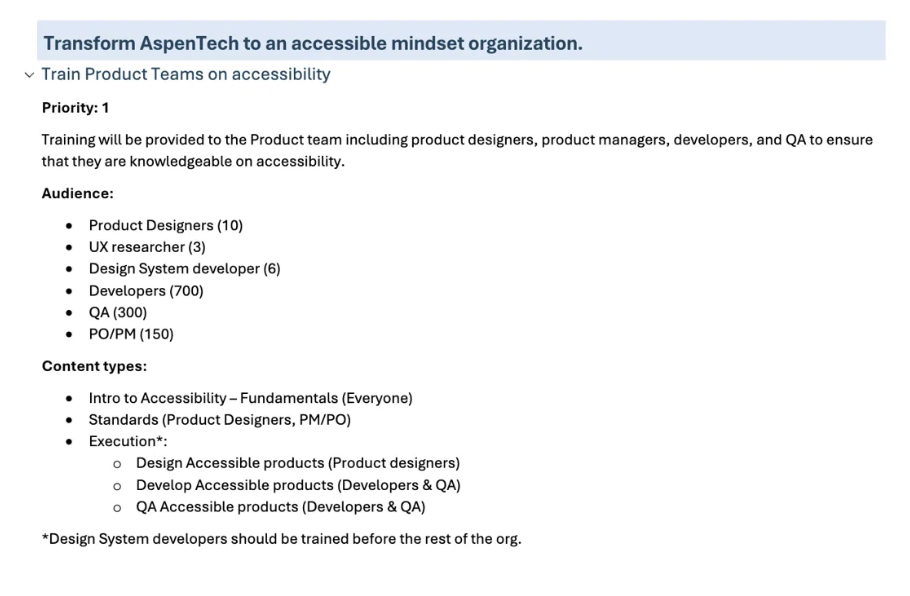
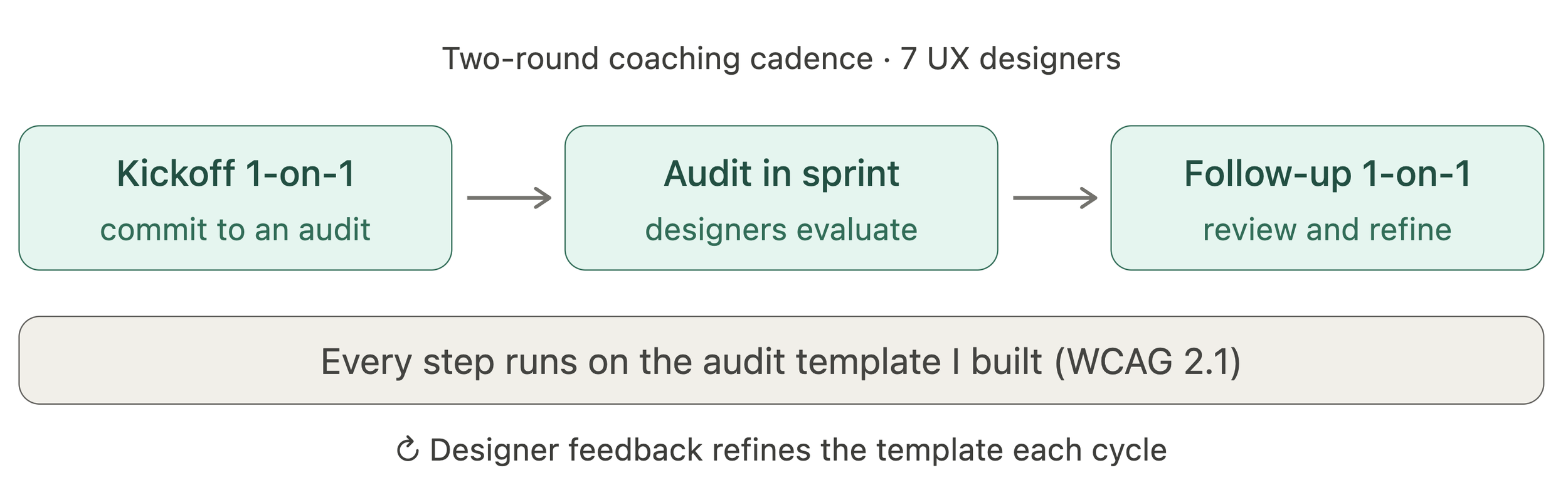
The repeatable cadence I designed to scale accessibility auditing across the design team. Instead of auditing every product myself, I built a two-round process: a kickoff 1-on-1 where each designer commits to auditing a product during the sprint, then a follow-up to review findings and refine the work. Every audit runs on a standard template I built to WCAG 2.1, and designer feedback sharpens that template each cycle — so the process improves as it scales.
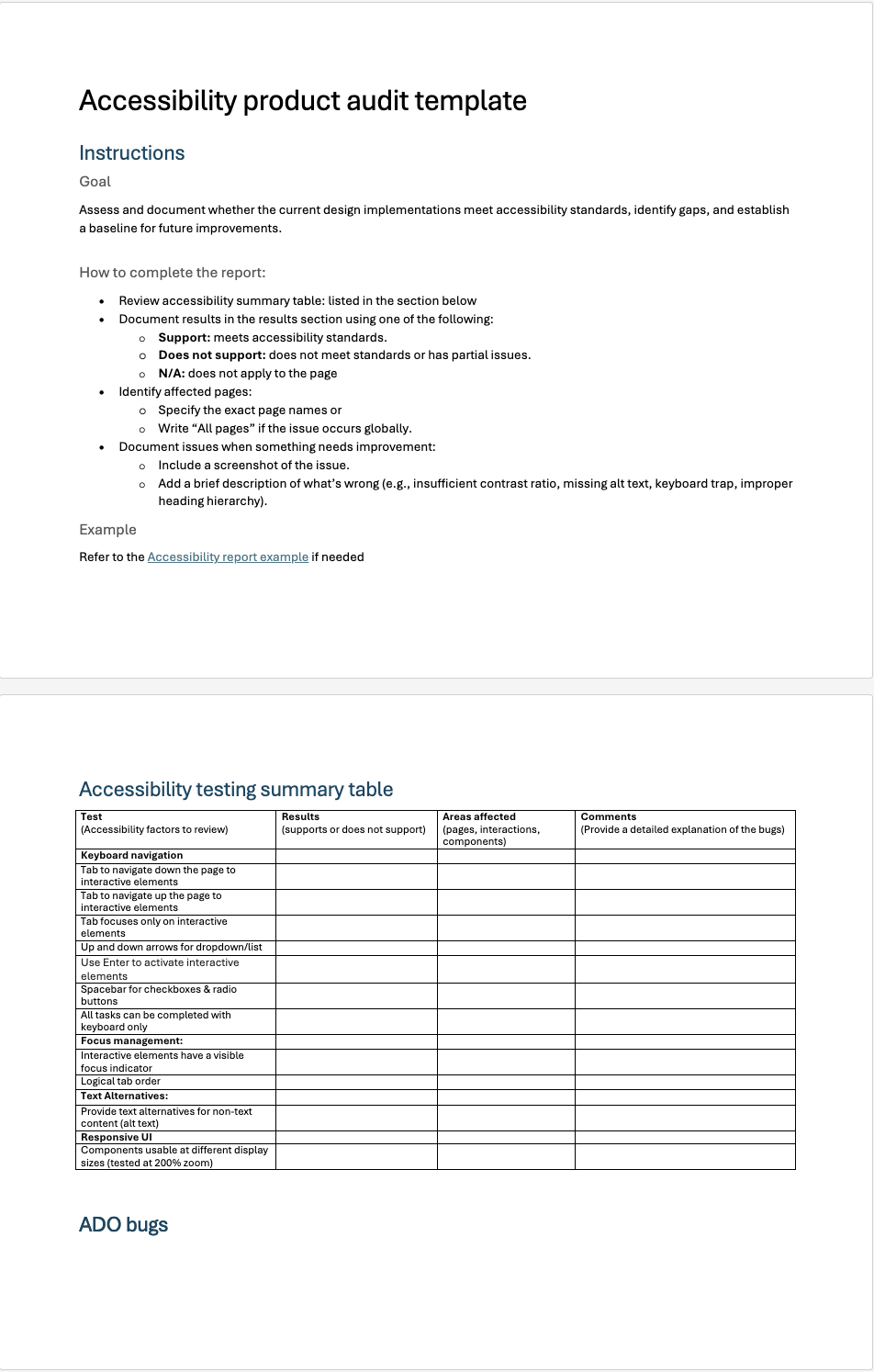
The Accessibility Audit Template — This artifact serves as the standard anchoring our entire product workstream. It translates dense WCAG 2.1 guidelines into concrete, repeatable checks that any designer can immediately execute.
Based on user feedback, I iteratively refined the template to optimize clarity and alignment with international standards:
Standardized Language: Updated the evaluation criteria from Needs Improvement to Supports and Does Not Support to better match formal compliance frameworks.
Enhanced Guidance: Added targeted subheaders beneath each table title to clarify expectations for the auditor.
Actionable Context: Introduced a dedicated Comments column alongside the existing Areas Affected and Screenshot fields.
By transforming complex criteria into an intuitive, guided tool, I ensured every designer could audit consistently against the same baseline—without needing to be an accessibility expert to contribute.
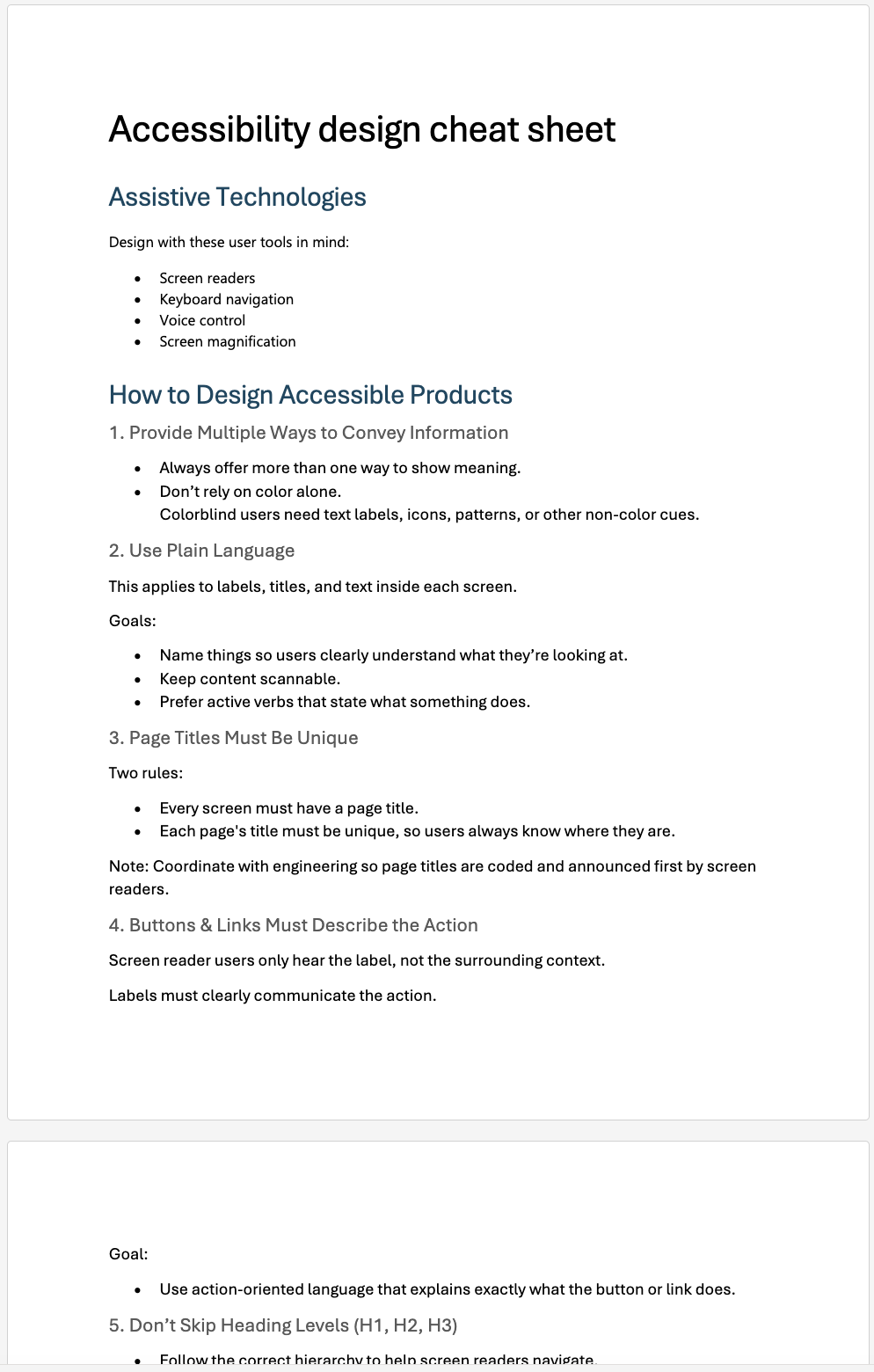
A quick-reference guide I created so designers could build accessibly day-to-day — without digging through the WCAG spec or coming to me each time. It distills the essentials: design for assistive tech, don't rely on color alone, use plain language, keep page titles unique, and make button and link labels describe the action. Where the audit template catches issues after the fact, this helps designers get it right while they design.
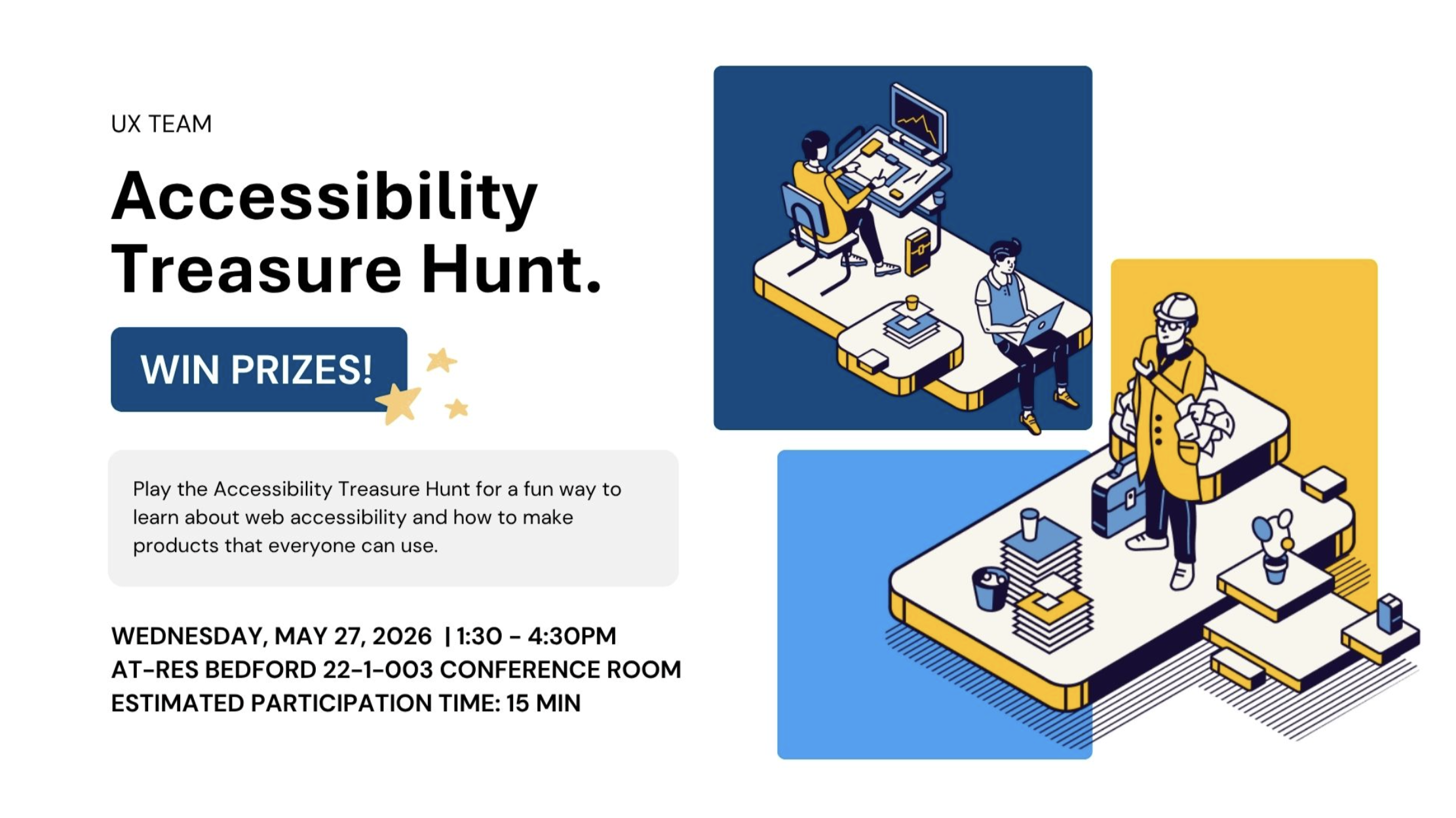
Event flyer designed by a teammate. I owned everything else: built the challenge content by auditing our products for the hunt tasks, handled the logistics — scheduling, invites, and room booking — partnered with marketing to get it onto the office screens, and ran the event itself.
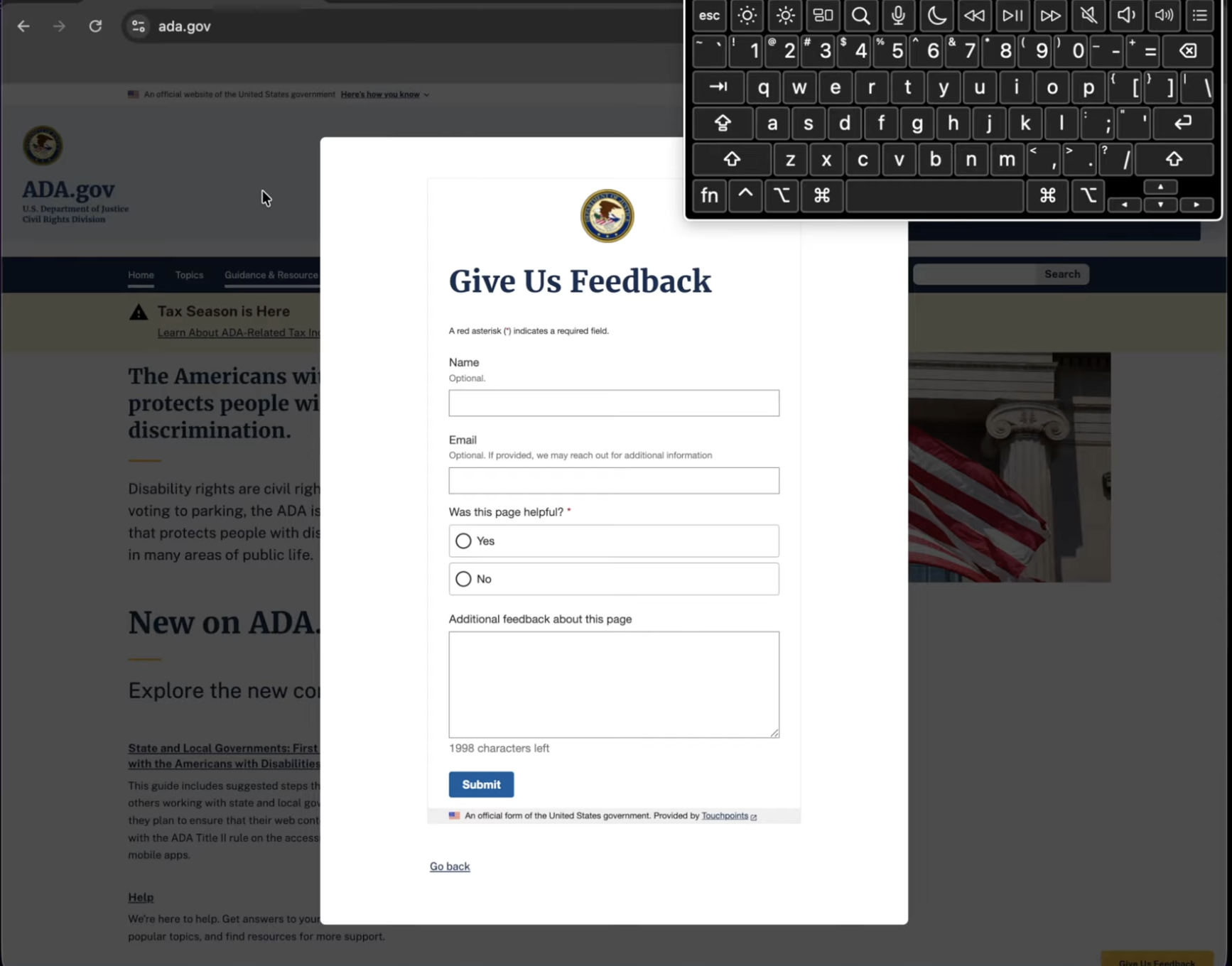
Enablement asset I created to drive adoption of the accessibility program. In this short demo I walk through real accessibility failures on live sites — a keyboard trap and a broken tab order — so the team could see and hear what users relying on a keyboard actually experience. I presented it at our accessibility lunch-and-learn to build awareness and buy-in before rolling out the audit process across the design team.